Advanced - Entry Pass
"Entry Pass" is advanced configuration that guarantees immediate entry without re-waiting for users who have passed through the Waiting Room once, preventing duplicate waiting and improving user experience while maintaining fairness. This guide covers configuration, operation, and best practices for Entry Pass.
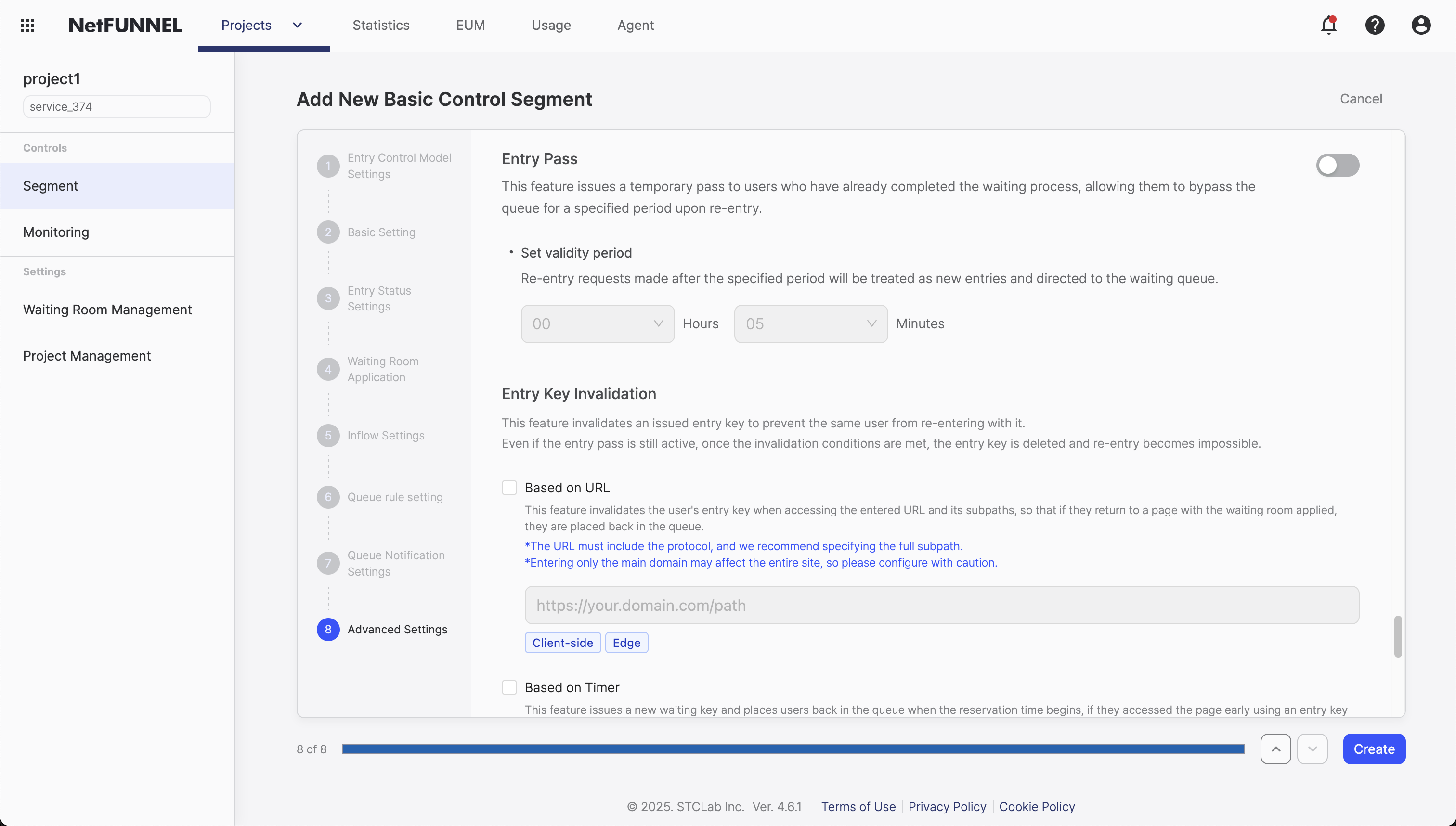
Overview
Entry Pass allows visitors who have successfully entered your service through the waiting room to re-enter without going through the queue again. This prevents duplicate waiting, improves user experience, and maintains fairness for first-time visitors.
Think of it like a subway transfer ticket: once you've paid and entered once, you can transfer between lines without paying again. Entry Pass works similarly—visitors who successfully accessed your service can return within a specified time window without re-waiting.
What This Feature Does
When a visitor completes the waiting room and enters your service, they receive an entry key. When Entry Pass is enabled, this key can be reused for a configurable period (1 minute to 24 hours), allowing them to:
- Re-enter immediately: No queue, no waiting, instant access
- Maintain fairness: First-time visitors still go through the queue
- Improve UX: Users don't have to wait again if they navigate away and return
This is particularly useful for:
- Users who accidentally navigate away from your service
- Users who need to check something and return
- Multi-step processes requiring multiple page loads
- Services where users might leave and come back
How It Works
Entry Pass allows the entry key received upon initial service access to be reused for re-entry within the configured validity period.
Entry Key Reuse
When a visitor successfully enters your service through the waiting room, they receive an entry key. When Entry Pass is enabled, this same key can be reused for re-entry within a configured validity period, functioning as an Entry Pass.
The entry key is stored on the visitor's client:
- Browser clients: Stored as an HTTP cookie
- Native app clients: Stored in app data storage (local storage, keychain, etc.)
The entry key contains information about:
- When the visitor first entered the service
- When the pass expires
- The pass validity duration
- A unique identifier linking the pass to the visitor
Pass Validity Period
Entry Pass remains valid for the configured duration, counting from the initial entry time (when they first accessed the service through the waiting room).
Key calculation:
Entry Pass Expiration Time = Initial Entry Time + Configured Validity Period
For example:
- Visitor enters at 10:00 AM
- Entry Pass duration set to 30 minutes
- Entry Pass expires at 10:30 AM
During this validity window, the visitor can re-enter as many times as they need without going through the waiting room again.
Re-entry Process
When a visitor attempts to access your service again within the Entry Pass validity window:
If Entry Pass is valid:
- System checks the Entry Pass stored on the visitor's client
- Verifies pass hasn't expired (current time < entry time + duration)
- Grants immediate access - no queue, no waiting
- Visitor continues their session seamlessly
If Entry Pass expired:
- System detects the pass has expired
- Entry Pass is cleared/invalidated
- Visitor must go through the waiting room again
- A new Entry Pass is issued upon successful entry
Storage Mechanisms
The Entry Pass uses the same storage mechanisms as Queue Position Retention:
Browser clients (cookie-based):
- Uses HTTP cookies to store the Entry Pass
- Same limitations apply:
- Only works within the same browser and device
- Switching browsers loses the pass
- Private/incognito mode doesn't preserve the pass
- Clearing cookies invalidates the pass
Native app clients (app data storage):
- Uses app data storage to maintain the Entry Pass
- More reliable than browser cookies
- Pass persists across app sessions within the same device
Timeline Example
Timeline: Entry Pass in Action

10:00:00 AM  Visitor accesses your service (initial request)
10:00:10 AM  Visitor enters waiting room (Queue #47)
              [OR: No waiting room active, proceeds directly to entry]

10:01:15 AM  Visitor's queue position reached (if queued)
10:01:15 AM  → Entry granted: Visitor enters the service
10:01:15 AM  → Entry key received (valid until 10:31:15 AM - 30 min Entry Pass duration)

10:02:00 AM  Entry key stored on client
             → Can re-enter anytime until 10:31:15 AM using the same key

10:05:30 AM  Visitor navigates away from service to check something
10:05:45 AM  Visitor returns to service
             → Entry Pass still valid
             → Immediate entry, no queue required

10:20:00 AM  Visitor leaves service again
10:25:00 AM  Visitor returns to service
             → Entry Pass still valid
             → Immediate entry, no queue required

10:31:15 AM  Entry key expires
10:35:00 AM  Visitor returns to service
             → Entry Pass expired
             → Must go through waiting room again
             → Assigned new Queue #152
             → Gets new entry key upon entry
This example shows how Entry Pass allows multiple re-entries within the validity window while maintaining the integrity of the queue system for first-time visitors.
Configuration
Default Behavior
When disabled (default OFF):
- Every entry requires going through the waiting room
- No Entry Pass functionality
- Visitors must wait each time they access your service
When enabled:
- The entry key received upon service access can be reused for re-entry
- Validity period: 1 minute to 24 hours (configurable)
- Validity starts from the initial entry time (when they first accessed the service)
Configuration Steps
You can configure Entry Pass when creating or editing a Basic Control Segment:
- Navigate to your segment's settings (creation or edit mode)
- Go to Advanced Settings section
- Enable Entry Pass: Turn on the Entry Pass function
- Set Validity Period: Specify time in seconds (minimum: 60 seconds / 1 minute, maximum: 86,400 seconds / 24 hours)
- Save Configuration: Apply your settings
Entry Pass is only available in Basic Control segments. If you're using other segment types, this feature is not available.
Best Practices
Recommended Validity Period Settings
| Session Type | Recommended Duration | Use Cases |
|---|---|---|
| Short events/Quick sessions | 5-10 minutes (300-600 seconds) | Brief interactions, "step away and return" scenarios |
| Medium sessions | 30-60 minutes (1,800-3,600 seconds) | Multi-step processes, "look something up and return" |
| Extended sessions | 2-4 hours (7,200-14,400 seconds) | Complex workflows, event scenarios |
| Maximum duration | Up to 24 hours (86,400 seconds) | Multi-day events, next-day return visits |
Setting Change Considerations
| Change Type | Impact | Recommendation |
|---|---|---|
| Increasing validity period | Extends validity for existing entry keys | Safe to apply at any time |
| Decreasing validity period | May invalidate existing entry keys earlier than expected | Use with caution during active events |
| Disabling Entry Pass | Immediately invalidates all existing entry keys | Forces all users through the queue |
Entry Pass validity is calculated from the initial entry time, not when settings are changed. The calculation is based on when the visitor first entered the service.
Example: A visitor who entered at 10:00 AM with a 30-minute Entry Pass:
- If you change the duration to 10 minutes at 10:15 AM
- The visitor's pass expires at 10:10 AM (10:00 AM + 10 minutes)
- They must go through the waiting room again
Service Type Considerations
| Service Type | Entry Pass Recommendation | Reason |
|---|---|---|
| Load-sensitive services (Databases, APIs with strict rate limits, compute-heavy operations) | Disable recommended | Need to strictly enforce Limited Inflow |
| Less sensitive services (Static content, simple lookups, read-only operations) | Enable recommended | Can safely improve user experience |
Users with valid Entry Pass can re-enter even when Limited Inflow capacity is reached. This means your server could handle more concurrent users than your Limited Inflow setting specifies.
Verification
Verify Entry Pass functionality with a simple test using Limited Inflow settings:
Setup:
- Configure Entry Pass with validity period of 10 minutes
- Set Limited Inflow to 0 (blocks all entries)
- Visit your service to confirm the waiting room appears
Test steps:
10:00 AM  Limited Inflow = 0, Entry Pass = 10 min
          → Service access attempt
          → Waiting room appears (entry blocked)

10:01 AM  Change Limited Inflow to 1
          → Wait ends, entry granted
          → Entry key received (can be reused until 10:11 AM)

10:05 AM  Change Limited Inflow back to 0
          → Services are now "closed"

10:10 AM  Attempt to access service again
          → Entry key still valid (reused from 10:01)
          → Entry granted despite Limited Inflow = 0

10:11 AM  Entry Pass expires
10:12 AM  Attempt to access service
          → Entry Pass expired
          → Waiting room appears (entry blocked)
What this proves:
- Entry Pass bypasses Limited Inflow restrictions
- Validity period works correctly (10 minutes from initial entry)
- After expiration, visitors must go through the queue again
This test confirms that Entry Pass allows re-entry even when your service capacity (Limited Inflow) is set to 0, demonstrating the priority of Entry Pass over capacity restrictions.
FAQ
Can I change settings in real-time?
Yes! Entry Pass settings are applied in real-time—changes take effect immediately without requiring segment restart or service interruption.
Examples of real-time updates:
- Adjust pass duration: Change Entry Pass validity from 30 minutes to 2 hours to accommodate longer sessions
- Disable Entry Pass: Turn OFF Entry Pass to force all users through the waiting room on every access
- Enable Entry Pass mid-event: Activate Entry Pass during an ongoing event to improve user experience for returning visitors
- Conditional pass control: Enable/disable Entry Pass based on traffic patterns or event phases
This flexibility allows you to adapt your access control strategy dynamically without downtime, responding to changing conditions in real-time.
For related configuration options, see Advanced Timing and Queue Position Retention documentation.