Advanced - Queue Position Retention
"Queue Position Retention" is advanced configuration that restores existing queue position even after browser accidental closure or temporary disconnection, preventing re-waiting and reducing duplicate queues. This guide covers configuration, implementation, and best practices for queue preservation.
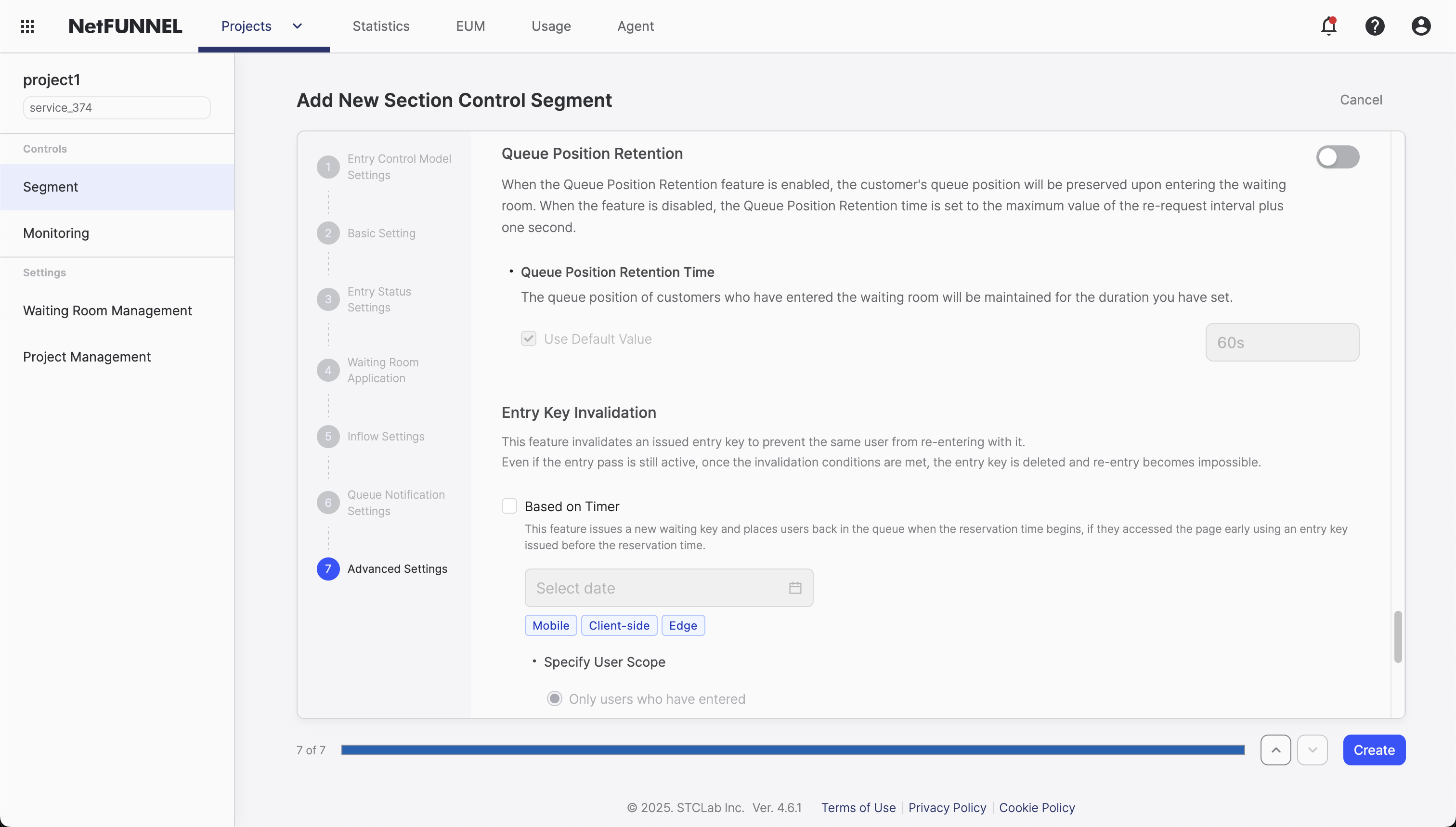
Overview
Queue Position Retention allows visitors to restore their queue position even after their client (browser or native app) loses connection. This prevents users from having to wait again and reduces duplicate queues.
What This Feature Does
When enabled, visitors who disconnect from the waiting room can reconnect and resume their place in the queue instead of being assigned a new position. This improves user experience by:
- Preventing re-waiting: Users don't lose their place if they close their browser or app
- Reducing duplicate queues: Fewer users creating new positions unnecessarily
- Maintaining fairness: Users keep their original wait time and position
How It Works
The retention mechanism operates through a multi-stage process to preserve queue positions even when clients disconnect:
Retention Timer Starts
The retention timer begins counting immediately when a waiting visitor stops making re-request calls to the NetFUNNEL server. Technically, this occurs after the visitor's last entry check request.
When a visitor is actively waiting in the queue, they periodically send re-request calls asking "Can I enter yet?" When these calls stop—whether due to browser closure, app termination, network interruption, or navigating away—the retention timer starts.
Reconnection Window
Within the retention window, visitors can reconnect and access the waiting room-protected service. When they attempt to enter again:
If within retention time:
- The system recognizes the visitor using their stored identifier
- They're restored to their original queue position
- No re-waiting required - they continue from where they left off
If retention time expired:
- A new key is issued for re-entry
- They receive a new queue position (at the end of the current queue)
- Treated as a new visitor with no position preserved
Storage Mechanisms
Browser clients:
- Uses HTTP cookies to store queue position identifiers
- Cookie persistence follows browser settings:
- Cookies survive browser closure (session cookies expire, persistent cookies remain)
- Cookies are browser-specific (Chrome cookies ≠ Firefox cookies)
- Cookies are domain-specific (different websites = different cookies)
Native app clients:
- Uses app data storage (local storage, keychain, etc. depending on platform)
- More reliable than cookies - data persists across app sessions
- No browser-specific limitations
Timeline Example
Timeline: Retention in Action

10:00:00 AM  Visitor enters waiting room, assigned Queue #47
10:00:30 AM  Visitor's browser/app is active, making re-requests every few seconds
10:01:15 AM  Visitor closes browser/app (or loses connection)
            ╱
            │ Retention timer starts here
            │
10:05:45 AM  [4 minutes 30 seconds later]
            │ Visitor attempts to access service again
            │
            ├─ IF retention time (e.g., 5 minutes) still active:
            │   → Restored to Queue #47
            │   → Continues waiting from original position
            │
            └─ IF retention time expired:
               → New key issued
               → Assigned new Queue #150 (end of current queue)
Configuration
Default Behavior
When disabled (default OFF):
- Queue position is maintained for only 1 second
- Provides minimal reconnection window
When enabled:
- Default retention time is 60 seconds
- You can customize retention time (maximum 7,200 seconds / 2 hours)
- System maintains queue position for the configured duration
Configuration Steps
You can configure Queue Position Retention when creating or editing a Section Control Segment:
- Navigate to your segment's settings (creation or edit mode)
- Go to Advanced Settings section
- Enable Queue Position Retention: Turn on the retention function
- Set Retention Time: Specify time in seconds (default is 60 seconds)
- Save Configuration: Apply your settings
The retention time must be greater than your segment's "Re-request Interval Maximum Value". This is critical!
For example, if you're using the default re-request interval settings (1-10 seconds), your retention time must be greater than 10 seconds. This ensures that the retention window is longer than the longest re-request interval, giving visitors enough time to reconnect before their position expires.
Best Practices
Recommended Retention Settings
Default recommendation: 60 seconds
- Provides a balanced window for accidental disconnections
- Short enough to prevent abuse while offering legitimate reconnection opportunity
- Works well for most typical events and traffic patterns
For most events (10-30 minutes / 600-1,800 seconds):
- Short events (less than 1 hour): Use 10 minutes (600 seconds)
- Provides reconnection window without unnecessary security exposure
- Most users reconnect within this window if they accidentally disconnect
- Medium events (1-3 hours): Use 15-20 minutes (900-1,200 seconds)
- Balances user convenience with event duration
- Accounts for users who may need to step away briefly
- Long events (3 hours or more): Use 30 minutes (1,800 seconds)
- Ensures users have reasonable reconnection opportunity
- Prevents frustration during extended waiting periods
Why not longer than 30 minutes:
- Security risk: Opens potential for key duplication and abuse
- System load: Extended retention periods can increase server load
- User expectations: Most accidental disconnections happen within minutes
- Cookie constraints: Browser cookies have limitations that make very long retention unreliable
When to use maximum duration (2 hours / 7,200 seconds):
- High-value transactions: Users making significant purchases shouldn't lose place due to technical issues
- Critical events: Once-in-a-lifetime sales or registrations where losing position is catastrophic
- Enterprise services: B2B scenarios where reconnection is expected and monitored
Storage Limitations
Browser clients (cookie-based):
- Position retention only works within the same browser and device
- Switching browsers or devices loses the position
- Private/incognito mode doesn't preserve cookies
- Users who clear cookies lose their position
Native app clients (app data storage):
- Position preserved across app sessions within the same device
- More reliable than browser cookies
- Switching devices requires re-authentication
FAQ
Can I change settings in real-time?
Yes! Queue Position Retention settings are applied in real-time—changes take effect immediately without requiring segment restart or service interruption.
Examples of real-time updates:
- Temporarily disable retention: Turn OFF Queue Position Retention during high traffic to force all users through the queue again
- Adjust retention window: Change retention time from 60 seconds to 10 minutes without affecting currently waiting visitors
- Emergency queue reset: Disable retention to reset all queue positions for a fresh start
- Conditional activation: Enable retention only during specific time periods by toggling it on/off as needed
This flexibility allows you to adapt your queue management strategy based on real-time conditions without downtime.
For related configuration options, see Advanced Timing and Entry Key Invalidation documentation.