Advanced - Entry Key Invalidation
Entry Key Invalidation allows you to selectively invalidate waiting keys and entry keys under specific conditions, ensuring visitors must re-queue. With timer-based invalidation, you can choose to invalidate entry keys only or both entry keys and waiting keys through the user scope setting. This guide explains the invalidation mechanisms, use cases, and configuration options.
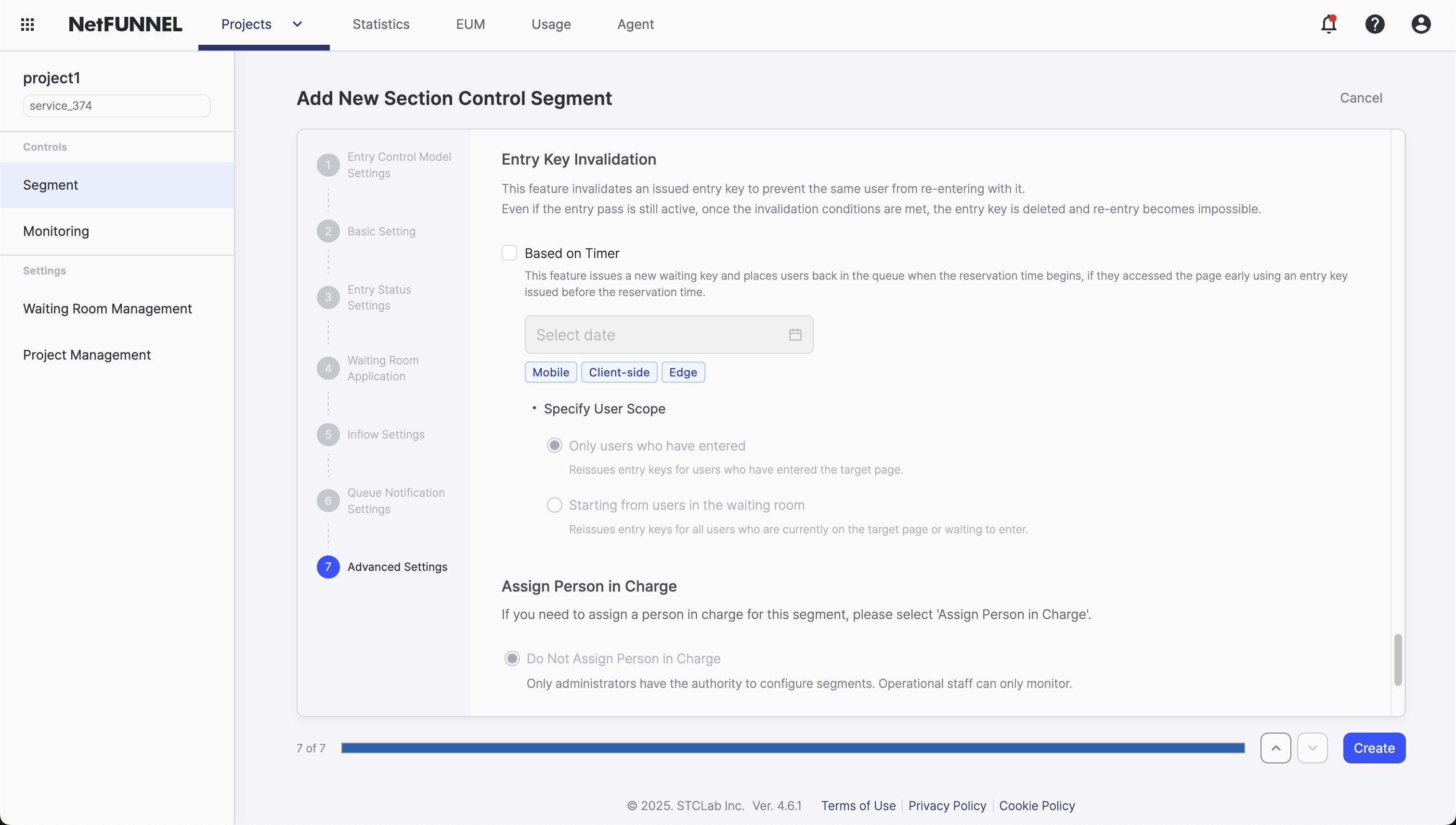
Overview
Entry Key Invalidation is a mechanism that invalidates keys to ensure visitors must obtain new keys and re-queue under specific business conditions. The invalidation target depends on the timer-based invalidation user scope setting: you can invalidate entry keys only or both entry keys and waiting keys. This feature works in conjunction with Queue Position Retention to provide granular control over access patterns.
Why Invalidation is Needed
Entry Key Invalidation can invalidate two types of keys:
1. Waiting Keys: Used for queue positions. When invalidated, visitors lose their saved queue position (even if Queue Position Retention is enabled) and must re-queue from the end.
2. Entry Keys: Issued when visitors enter the protected section. While Section Control doesn't have Entry Pass (entry keys aren't designed for waiting-free re-entry), invalidation ensures any potential side effects are prevented.
Timer-based invalidation is useful when you need to:
- Reset all queue positions: Invalidating waiting keys ensures that even visitors with retained queue positions (from Queue Position Retention) must start fresh at the end of the queue
- Force re-entry: Invalidating entry keys ensures that visitors who have already entered the protected section must go through the waiting room again if they attempt to access the service after the invalidation time
- Critical event phases: At important event milestones (e.g., main sale starts at 2:00 PM), invalidate all keys issued before that time to ensure fairness—everyone queues from the same starting point regardless of when they first entered
Section Control segments support Timer-based invalidation only. URL-based invalidation is not available because Section Control uses Code-based Integration (CBI) and does not support URL-Triggered Integration (UTI).
What Gets Invalidated
Entry Key Invalidation affects two types of keys:
1. Waiting Keys (used for queue positions):
- When invalidated: Queue Position Retention is bypassed
- Effect: Visitors lose their queue position and must start from the end of the queue, regardless of retention period
- Use case: Enforce fair re-queuing even when Queue Position Retention is enabled
2. Entry Keys (used for service entry):
- When invalidated: Entry keys issued at entry are forcibly invalidated
- Effect: Visitors who attempt to access the service must re-queue through the waiting room. While Section Control doesn't have Entry Pass (so entry keys aren't normally reused for waiting-free access), invalidation ensures any potential side effects are prevented
- Use case: Force re-queuing for critical service phases, ensuring all visitors go through the queue regardless of their entry key status
How It Works
Entry Key Invalidation operates on a simple principle: force key reissuance when invalidation conditions are met. This ensures visitors cannot rely on previously issued keys and must go through the waiting room again.
Technical Principle
Keys that meet the invalidation conditions will be forcibly invalidated, causing the system to issue a new key, regardless of retention periods. The invalidation target depends on the timer-based invalidation user scope setting:
- Timer-based invalidation: Works differently depending on the user scope setting:
- Entered users only: Invalidates entry keys only for users who have entered the service (waiting keys of waiting users are not affected)
- From waiting users: Invalidates entry keys of entered users and waiting keys of waiting users (waiting users must re-queue from the end)
- Waiting key invalidation: Even with Queue Position Retention enabled and regardless of the retention period, visitors who disconnect and reconnect will lose their previous queue position and start from the end
- Entry key invalidation: Entry keys issued at entry are invalidated when invalidation conditions are met. While Section Control doesn't have Entry Pass (entry keys aren't normally reused for waiting-free access), invalidation ensures visitors must re-queue through the waiting room, preventing any potential side effects
Entry Key Invalidation provides Timer-based invalidation for Section Control segments:
Timer-Based Invalidation
Automatically invalidate keys issued before a specific point in time. The invalidation target is determined by the user scope setting.
Use case example: Concert ticket reservation system
Let's say you're running a concert ticket reservation where:
- Warmup phase (1:00 PM - 2:00 PM): Early visitors can enter and browse seats
- Main sale starts (2:00 PM): The actual ticket purchase begins
- Requirement: All keys issued before 2:00 PM must be invalidated so everyone starts from the same queue position when main sale begins
What happens with waiting keys:
1:30 PM   Visitor A enters queue, gets waiting key
          → Assigned queue position #50

1:45 PM   Visitor A's browser closes
          → Queue Position Retention saves position #50

1:58 PM   Timer invalidation set for 2:00 PM

2:00 PM   Timer invalidation triggers
          → All waiting keys issued before 2:00 PM invalidated

2:05 PM   Visitor A reconnects
          → Saved queue position #50 is invalidated
          → Must re-queue from end (new position #300)
What happens with entry keys:
1:30 PM   Visitor B enters service, receives entry key
          → Browsing seat selection pages

1:45 PM   Visitor B continues browsing
          → Entry key still valid, accessing pages within section

2:00 PM   Timer invalidation triggers
          → All entry keys issued before 2:00 PM invalidated

2:05 PM   Visitor B tries to access purchase page
          → Entry key invalidated
          → Must go through waiting room again
          → Gets new entry key after waiting
Configuration:
-
Invalidation Time (minimum: 1 minute resolution):
Invalidation Time: 2:00 PM -
User Scope:
- Entered users only: Invalidates (reissues) entry keys for users who have entered the service. Waiting users are not affected.
- From waiting users: Invalidates (reissues) entry keys of entered users and waiting keys of waiting users.
How it works:
- System checks when each key was issued against the configured invalidation time
- Keys issued before the invalidation time are invalidated according to the user scope setting (regardless of retention periods)
- Keys issued after the invalidation time have normal behavior
- Entered users only selected: Only entry keys are invalidated, requiring re-entry through the waiting room. Waiting users' waiting keys are not affected.
- From waiting users selected: Both entry keys of entered users and waiting keys of waiting users are invalidated, requiring waiting users to re-queue from the end
Configuration
Default Behavior
Timer-based invalidation is independent and can be enabled or disabled:
- Timer-based invalidation OFF (default): No timer-based invalidation occurs
- Keys remain valid and continue to function normally when invalidation is disabled
When enabled:
- Invalidation checks occur at each access attempt
- Keys that meet the invalidation conditions are immediately invalidated
- New keys must be obtained through the waiting room
Configuration Steps
You can configure Entry Key Invalidation when creating or editing a Section Control Segment:
- Navigate to your segment's settings (creation or edit mode)
- Go to Advanced Settings section
- Enable invalidation method:
- Enable/disable Timer-based invalidation
- Configure invalidation conditions:
- Timer-based: When enabled, configure the following settings:
- Set invalidation time (minimum: 1 minute resolution)
- Select user scope:
- Entered users only: Invalidates entry keys only
- From waiting users: Invalidates entry keys of entered users and waiting keys of waiting users
- Timer-based: When enabled, configure the following settings:
- Save Configuration: Apply your settings
Section Control segments:
- Only Timer-based invalidation is available
- URL-based invalidation is not supported (no UTI/Trigger rule support)
Best Practices
When to Use Timer-Based Invalidation
Use timer-based invalidation when:
- Event phase transitions: When transitioning from one phase to another (e.g., warmup → main sale), invalidate all existing keys so everyone starts from the same queue position
- Critical milestone times: At important times (e.g., main sale starts at 2:00 PM), ensure fairness by forcing everyone to re-queue regardless of when they first entered
- Queue position reset: When Queue Position Retention is enabled but you need to reset all saved positions at a specific time (e.g., invalidating waiting keys to clear retained queue positions)
User Scope Selection Guide:
- Entered users only: When you want only entered users to re-queue while preserving waiting users' queue positions
- From waiting users: When you want all users (including waiting users) to re-queue fairly at the scheduled time
Concrete example:
- Concert ticket sale: Warmup phase from 1:00-2:00 PM allows browsing. At 2:00 PM (main sale start), invalidate all keys issued before 2:00 PM. This ensures everyone who wants to purchase must queue from the same starting point, regardless of whether they were browsing during warmup or joining fresh.
Precautions
Consider user experience:
- Too frequent invalidation can frustrate users
- Communicate invalidation timing to users when possible
- Balance fairness with usability
Monitor system load:
- Sudden influx of re-queuing users can create spikes
- Plan invalidation timing to avoid overload
- Consider traffic patterns before setting invalidation times
Test thoroughly:
- Verify invalidation triggers work as expected
- Test with Queue Position Retention combinations
- Ensure users understand they need to re-queue
Interactions with Other Features
Queue Position Retention Interaction
When Queue Position Retention is enabled and Entry Key Invalidation is triggered:
- Timer-based invalidation:
- Entered users only: Only entry keys are invalidated (reissued), so waiting keys are not affected. Waiting users' queue positions are maintained.
- From waiting users: Waiting keys are invalidated (reissued), causing users to lose their queue position and start from the end. Even if within Queue Position Retention period, key invalidation takes priority.
- New key issued: For invalidated keys, users receive new keys and join the queue from the back.
Priority: Invalidation > Queue Position Retention (only applies when waiting keys are invalidated)
Example scenario 1: From waiting users
Retention: 5 minutes
Timer invalidation: 10:28 AM
User scope: From waiting users
Timeline:
  10:25 AM → User disconnects (queue position #50 retained)
  10:28 AM → Timer invalidation (waiting key invalidated)
  10:29 AM → User reconnects (timer already triggered)
              → Must re-queue from end
Example scenario 2: Entered users only
Timer invalidation: 2:00 PM
User scope: Entered users only
Timeline:
  1:30 PM → User A: Service entry completed (has entry key)
  1:45 PM → User B: Waiting (has waiting key, position #10)
  2:00 PM → Timer invalidation triggers
          → User A: Entry key invalidated (must wait for re-entry)
          → User B: Waiting key maintained (position #10 maintained)
Verification
You can verify Entry Key Invalidation functionality with a simple test:
Setup:
- Configure Section Control segment with Queue Position Retention enabled
- Enable Entry Key Invalidation (Timer based)
- Set invalidation time to 10:20 AM
Test: Waiting Key Invalidation (with Queue Position Retention):
10:00 AM  Visitor A enters queue, gets waiting key
          → Queue position #50 assigned

10:05 AM  Visitor A's browser closes/crashes
          → Queue Position Retention saves position #50

10:20 AM  Timer invalidation triggers
          → All waiting keys issued before 10:20 AM invalidated

10:25 AM  Visitor A reconnects
          → Saved position #50 is invalidated
          → Must re-queue from end (new position #200)
          → ✅ Proves: Waiting key invalidation bypasses Queue Position Retention
What this proves:
- Invalidated waiting keys cause loss of retained queue positions
- Key invalidation takes priority over Queue Position Retention
- Users must re-queue from the end after waiting key invalidation
FAQ
Can I use invalidation without Queue Position Retention?
Yes, invalidation is independent. However, invalidation has maximum impact when used with Queue Position Retention, as it provides granular control over when to bypass queue position protection and when to invalidate entry keys to prevent any potential side effects.
What happens if I trigger invalidation multiple times?
Invalidation is event-based: each time a key is checked and meets invalidation conditions, it gets invalidated. Timer-based invalidation checks keys issued before the configured time.
Can I disable invalidation after enabling it?
Yes! Disabling Entry Key Invalidation is a real-time change that takes effect immediately. Keys that were invalidated remain invalid, but new keys issued after disabling invalidation will have normal behavior.
Can I invalidate waiting keys and entry keys separately?
With timer-based invalidation, you can choose through the user scope setting:
- Entered users only: Only entry keys are invalidated (reissued). Waiting users' waiting keys are not affected.
- From waiting users: Both entry keys of entered users and waiting keys of waiting users are invalidated (reissued).
For related configuration options, see Advanced Timing and Queue Position Retention documentation.