Section Control Integration
Complete guide for implementing Section Control with NetFUNNEL Android Agent using code-based integration.
This is one of two integration methods available. See the Integration Methods Overview to compare with Basic Control and choose the best approach for your use case.
How It Works
User Experience:
- User clicks button or triggers action
- Waiting room appears on current screen
- When entry allowed, waiting room closes and user enters active section
- User can navigate through multiple screens within the section
- When user completes the process, key is returned and next user can enter
Best For:
- Multi-step processes (checkout, registration, booking)
- Maintaining fixed concurrent users in specific areas
- User session management
- Resource-intensive workflows requiring controlled capacity
Key Difference from Basic Control:
- Basic Control: Controls entry speed (key returned quickly)
- Section Control: Maintains fixed capacity (key held until section exit)
Prerequisites
- Installation & Initialization completed
- NetFUNNEL console access
- Android development environment
This guide uses a sample application to demonstrate Section Control integration patterns. Your actual application code will differ from the examples shown. Focus on understanding the integration concepts and adapt the patterns to your specific codebase, function names, and business logic.
💡 Practice Template: Check out our Sample Projects for an Android Application (Single Activity) template ready for NetFUNNEL SDK integration practice.
Step 1: Create a Segment
Code-based Integration supports both Basic Control and Section Control. This guide uses Section Control.
1.1 Create New Segment
- Go to NetFUNNEL console →
Projects→Segment - Click the
+button to create a new segment
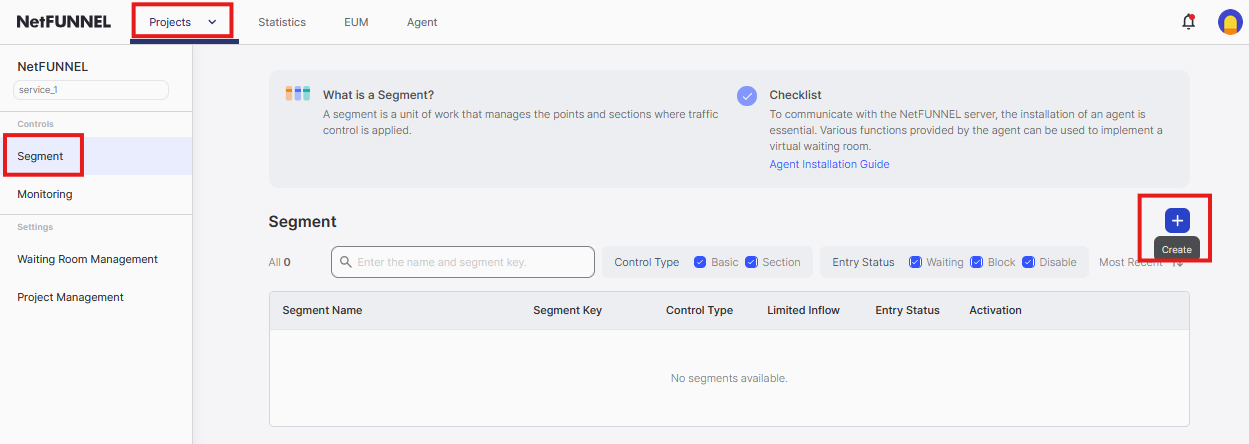
1.2 Select Control Type
Choose Section Control and click Next
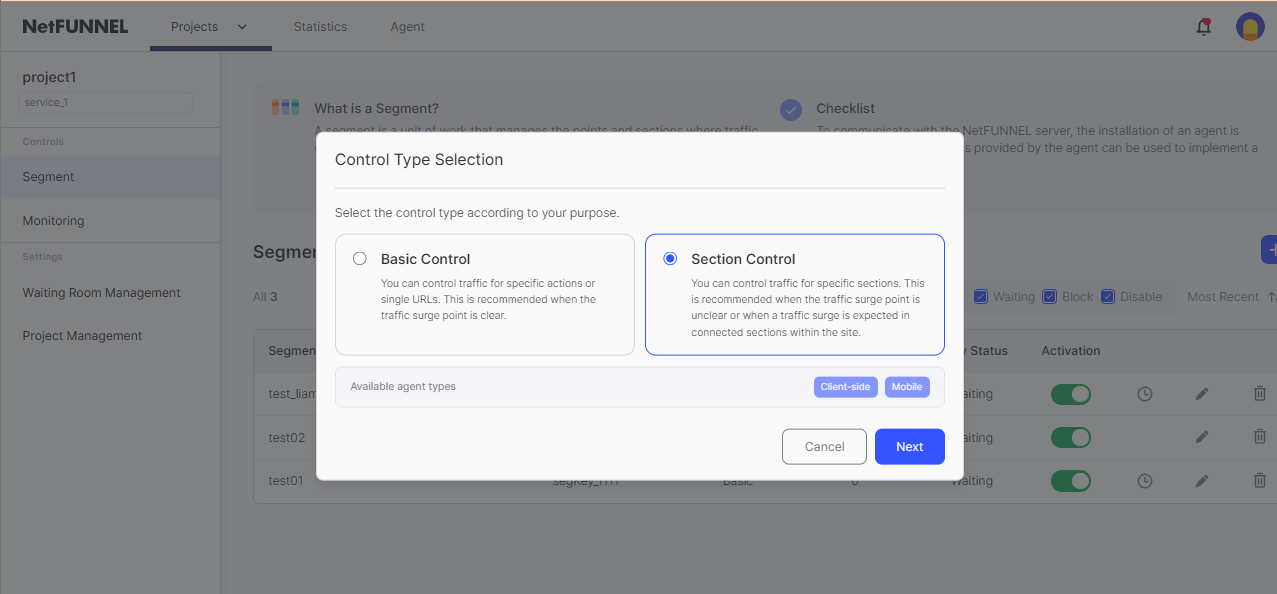
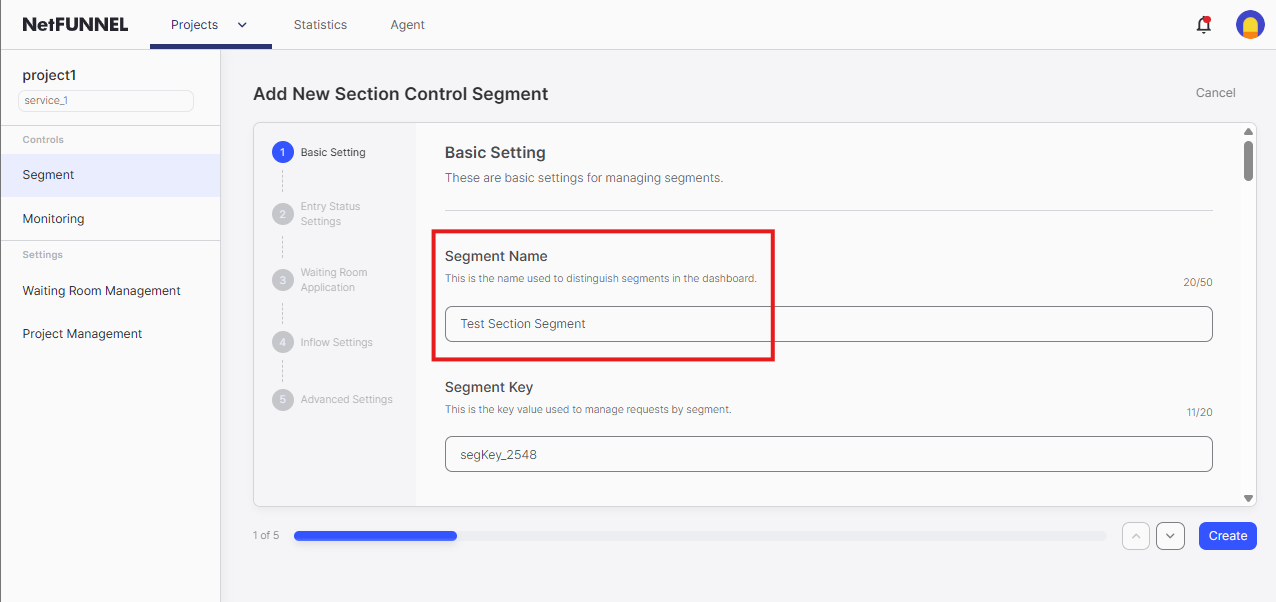
1.3 Configure Segment
Segment Name: Enter a descriptive name (e.g., "Checkout Process", "Registration Flow", "Booking Section")
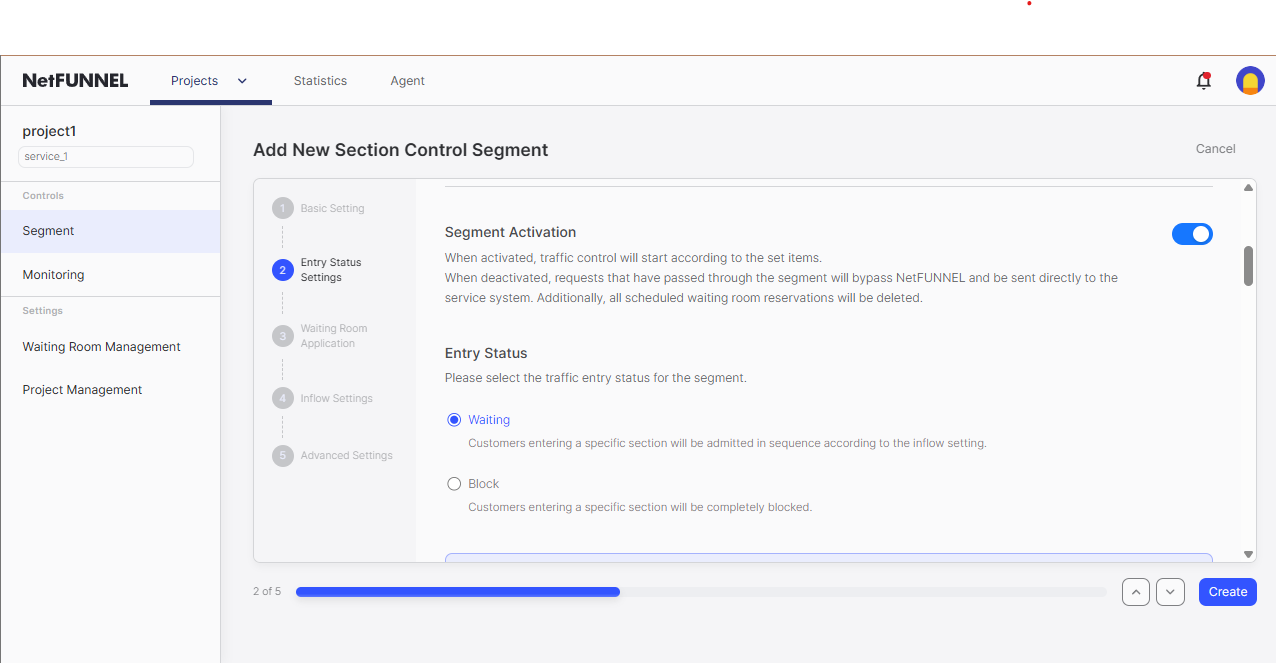
Entry Status:
- ✅ Segment Activation enabled
- Entry Status:
Waiting(sends users to waiting room)
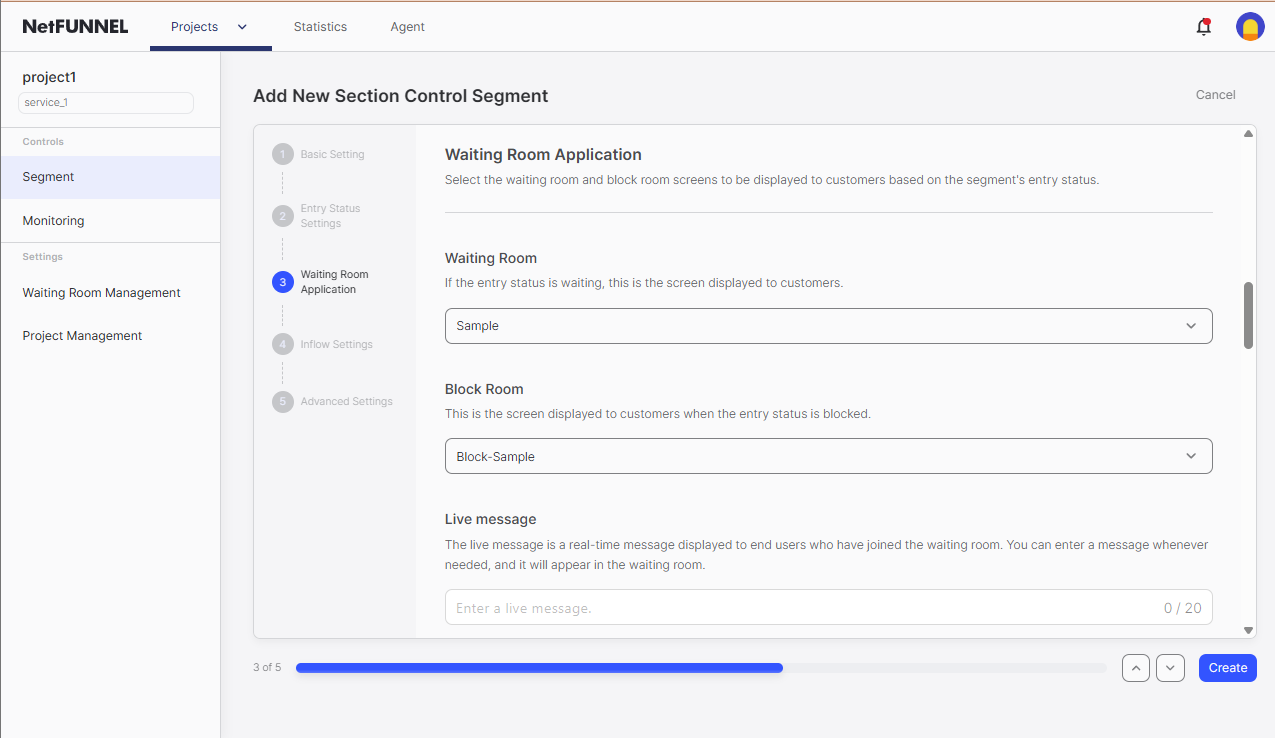
Waiting Room Application:
- Use default settings for testing
- Leave Live Message blank
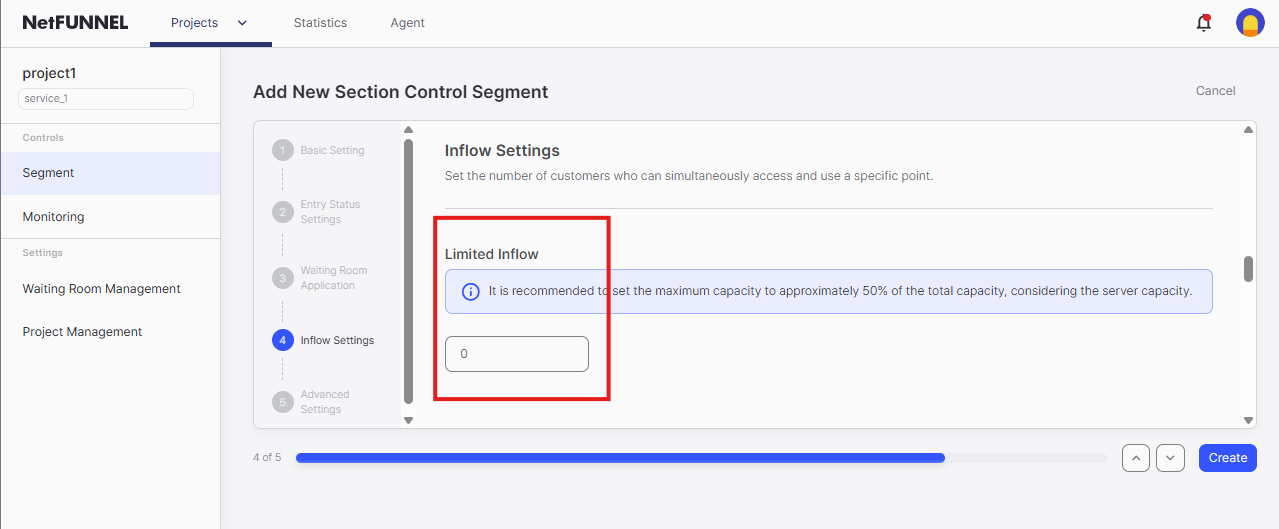
Limited Inflow:
- Set to
0for testing (no one admitted, waiting room always appears) - This controls section capacity - how many users can be active in the section simultaneously
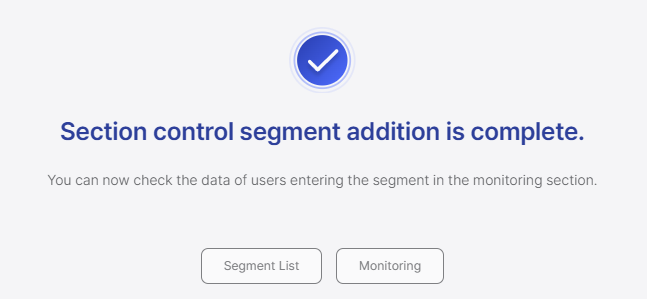
1.4 Create Segment
Click Create to finalize the segment
Step 2: Identify Key Issuance Integration Point (nfStartSection)
The following examples use a sample application for demonstration purposes. Your actual application code will naturally differ from what is shown here. Adapt the integration patterns to match your specific code structure, button IDs, function names, and business logic.
💡 Need a practice project? Check out our Sample Projects for an Android Application (Single Activity) template ready for NetFUNNEL SDK integration practice.
Understanding Our Sample Application:
Let's examine our sample application to understand where NetFUNNEL section protection should be applied:
2.1 Identify the Target Button in Layout
<!-- fragment_main.xml -->
<com.google.android.material.card.MaterialCardView
    android:id="@+id/card_section_control_function"
    android:layout_width="0dp"
    android:layout_height="wrap_content"
    android:clickable="true"
    android:focusable="true"
    app:cardCornerRadius="12dp"
    app:cardElevation="4dp"
    app:rippleColor="?attr/colorSecondary"
    app:strokeColor="?attr/colorSecondary"
    app:strokeWidth="1dp">

    <LinearLayout
        android:layout_width="match_parent"
        android:layout_height="wrap_content"
        android:orientation="vertical"
        android:padding="24dp">

        <TextView
            android:layout_width="match_parent"
            android:layout_height="wrap_content"
            android:gravity="center"
            android:text="@string/section_control_function"
            android:textAppearance="?attr/textAppearanceTitleLarge"
            android:textColor="?attr/colorSecondary" />

        <TextView
            android:layout_width="match_parent"
            android:layout_height="wrap_content"
            android:layout_marginTop="8dp"
            android:gravity="center"
            android:text="@string/section_control_function_desc"
            android:textAppearance="?attr/textAppearanceBodyMedium" />

    </LinearLayout>
</com.google.android.material.card.MaterialCardView>
Our Assumptions for This Sample:
- The "Section Control (Code-based Integration)" card (
card_section_control_function) represents a multi-step process - This could be: checkout flow, registration process, booking workflow, or multi-stage form
- Users will navigate through multiple screens: Section1 → Section2 → End
- We need to control how many users can be in this entire flow simultaneously
2.2 Find the Click Listener for This Button
// MainFragment.kt
override fun setupViews() {
    binding.cardBasicControlFunction.setOnClickListener {
        Log.d("MainActivity", "Basic Control Function button clicked")
        lifecycleScope.launch {
            navigationManager.navigateWithDelay(
                R.id.action_mainFragment_to_basicControlFragment
            )
        }
    }

    binding.cardSectionControlFunction.setOnClickListener {
        Log.d("MainActivity", "Section Control Function button clicked")
        lifecycleScope.launch {
            navigationManager.navigateWithDelay(
                R.id.action_mainFragment_to_sectionControlSection1Fragment
            )
        }
    }
}
2.3 Examine the Section Flow
Complete Section Flow:
- MainFragment: User clicks section control card
- SectionControlSection1Fragment: First step of the process
- SectionControlSection2Fragment: Second step of the process
- SectionControlEndFragment: Final completion step
Integration Strategy:
- Section Entry: Call
nfStartSection()in MainFragment before navigation - Section Activities: Users can freely navigate within Section1 → Section2 → End
- Section Exit: Call
nfStopSection()in SectionControlEndFragment when process completes
2.4 Identify the Integration Point
- Target Card:
card_section_control_function(the multi-step process entry) - Click Listener:
setupViews()method sets up the click handler - Integration Location: Right before
navigationManager.navigateWithDelay()is called - Why Here: This is the exact moment before entering the protected section
- Protection Strategy: Add NetFUNNEL section queue before section entry
Complete Flow Analysis:
- Fragment Creation:
onViewCreated()callssetupViews() - Button Setup:
setupViews()sets up click listeners for each card - User Action: User clicks "Section Control (Code-based Integration)" card
- Current Behavior:
navigationManager.navigateWithDelay()executes immediately - Section Load: This triggers entry into the multi-step process
The Logic:
- Without NetFUNNEL: Card click → Immediate section entry → Potential section capacity overflow
- With NetFUNNEL: Card click → Queue check → Controlled section entry → Section capacity maintained
Step 3: Implement Key Issuance Function (nfStartSection)
The example below shows how to integrate NetFUNNEL into the sample application's MainFragment click handler. Adapt this pattern to your actual code structure - you may have different function names, event handlers, or business logic that needs protection.
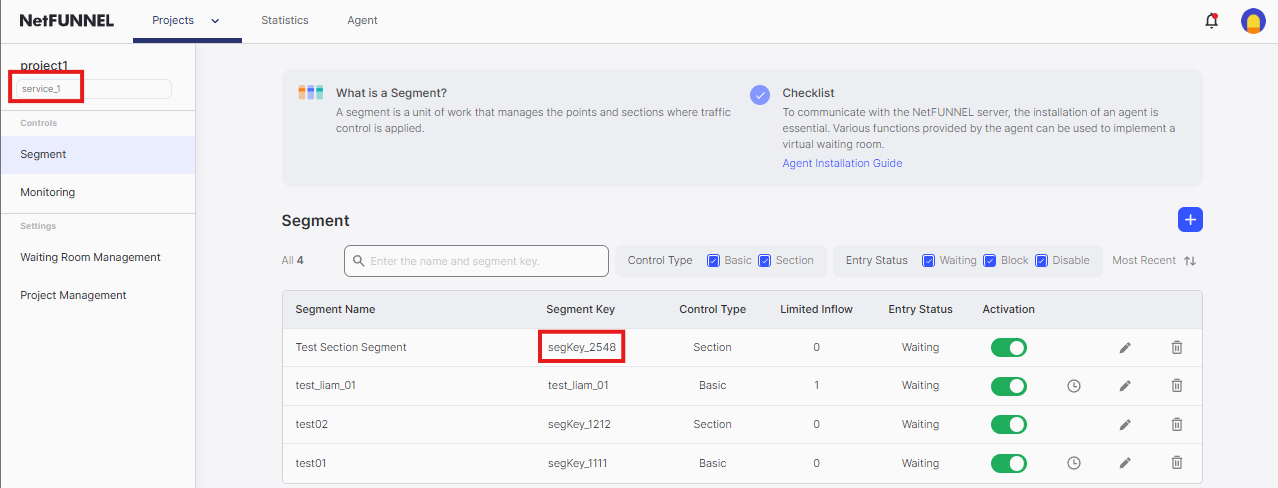
3.1 Get Your Keys
First, find your Project Key and Segment Key in the console:
- Go to NetFUNNEL console →
Projects→Segment - Click on your segment
- Copy the Project Key and Segment Key
3.2 Understand the nfStartSection Function
The nfStartSection function has this basic structure:
Netfunnel.nfStartSection(
    projectKey = "your_project_key",    // From console
    segmentKey = "your_segment_key",    // From console
    callback = yourCallback,            // Callback to handle response
    activity = this                     // Current activity context
)
Java equivalent:
Netfunnel.INSTANCE.nfStartSection(
    "your_project_key",     // From console
    "your_segment_key",     // From console
    yourCallback,           // Callback to handle response
    this                    // Current activity context
);
For complete details about nfStartSection parameters, callback handling, and response formats, see the API Reference.
3.3 Start with Your Current Code
Current Implementation:
// MainFragment.kt
override fun setupViews() {
    binding.cardSectionControlFunction.setOnClickListener {
        Log.d("MainActivity", "Section Control Function button clicked")
        lifecycleScope.launch {
            navigationManager.navigateWithDelay(
                R.id.action_mainFragment_to_sectionControlSection1Fragment
            )
        }
    }
}
The Core Concept:
- Business Logic:
navigationManager.navigateWithDelay()represents entry into a multi-step section - Integration Point: We need to wrap this section entry with NetFUNNEL protection
- Wrapping Strategy: Use
nfStartSection()to control section capacity before the multi-step process begins
Why Wrap Here:
- This is the exact moment before section entry begins
- Wrapping here protects the entire multi-step section from section capacity overflow
- The business logic remains unchanged - we just add a section capacity control layer
3.4 Add Required Imports
Before implementing NetFUNNEL, add the necessary imports to your Fragment:
// MainFragment.kt
import com.nf4.Netfunnel
import com.nf4.NetfunnelCallback
Java equivalent:
// MainFragment.java
import com.nf4.Netfunnel;
import com.nf4.NetfunnelCallback;
Key Imports:
com.nf4.Netfunnel- Main NetFUNNEL classcom.nf4.NetfunnelCallback- Callback interface for responses
3.5 Add Basic NetFUNNEL Protection (Success Only)
Wrap the Business Logic:
// MainFragment.kt
import com.nf4.Netfunnel
import com.nf4.NetfunnelCallback

override fun setupViews() {
    binding.cardBasicControlFunction.setOnClickListener {
        Log.d("MainActivity", "Basic Control Function button clicked")
        lifecycleScope.launch {
            navigationManager.navigateWithDelay(
                R.id.action_mainFragment_to_basicControlFragment
            )
        }
    }

    binding.cardSectionControlFunction.setOnClickListener {
        Log.d("MainActivity", "Section Control Function button clicked")
        startSectionControl()
    }
}

private fun startSectionControl() {
    Netfunnel.nfStartSection(
        projectKey = "your_project_key",
        segmentKey = "your_segment_key",
        callback = sectionControlCallback,
        activity = requireActivity()
    )
}

private val sectionControlCallback = object : NetfunnelCallback() {
    override fun onSuccess(statusCode: Int, message: String) {
        // User can proceed - execute original logic
        Log.d("NetFUNNEL", "onSuccess(statusCode=$statusCode, message='$message')")
        lifecycleScope.launch {
            navigationManager.navigateWithDelay(
                R.id.action_mainFragment_to_sectionControlSection1Fragment
            )
        }
    }

    override fun onBlock(statusCode: Int, message: String) {
        Log.d("NetFUNNEL", "onBlock(statusCode=$statusCode, message='$message')")
    }

    override fun onClose(statusCode: Int, message: String) {
        Log.d("NetFUNNEL", "onClose(statusCode=$statusCode, message='$message')")
    }

    override fun onContinue(
        statusCode: Int,
        message: String,
        aheadWait: Int,
        behindWait: Int,
        waitTime: String,
        progressRate: Int
    ) {
        Log.d("NetFUNNEL", "onContinue(statusCode=$statusCode, message='$message', aheadWait=$aheadWait, behindWait=$behindWait, waitTime='$waitTime', progressRate=$progressRate)")
    }

    override fun onError(statusCode: Int, message: String) {
        Log.d("NetFUNNEL", "onError(statusCode=$statusCode, message='$message')")
    }

    override fun onNetworkError(statusCode: Int, message: String) {
        Log.d("NetFUNNEL", "onNetworkError(statusCode=$statusCode, message='$message')")
    }
}
What Changed:
- Wrapped:
navigationManager.navigateWithDelay()is now inside theonSuccesscallback - Conditional: Only the specific card gets NetFUNNEL protection
- Success-Only: Section entry occurs only when NetFUNNEL allows entry
- Complete Interface: All required callback methods are implemented with proper logging
In Android, NetfunnelCallback is an interface that requires implementing ALL methods. You cannot implement only onSuccess - you must provide implementations for all callback methods. This implementation provides complete callback handling with proper logging for all response types.
Now let's test your implementation to make sure everything is working correctly.
Run your app and click the "Section Control (Code-based Integration)" card. You should see a waiting room WebView appear on your screen. To verify everything is working properly, check the Logcat for NetFUNNEL logs.
If you don't see the waiting room, make sure you set Limited Inflow to 0 in the Configure Segment step. This setting controls whether users are sent to the waiting room or allowed to proceed directly.
Enable NetFUNNEL Logging for Better Debugging:
Enable debug logging by setting printLog = true in your Application class, then filter Logcat with package:mine NetFUNNEL. For detailed setup instructions, see the Test NetFUNNEL Initialization) section.
What to Look For:
When you click the Section Control card with Limited Inflow = 0, you should see logs like this:
2025-09-15 17:10:41.744  6881-6881  NetFUNNEL               com...ample_android_single_activity  D  [NF4] Initialization successful. NetFUNNEL Version: 4.3.3-onprem
2025-09-15 17:10:47.409  6881-6897  NetFUNNEL               com...ample_android_single_activity  D  [NF4] Initial entry detected. Request(5101), Work(projectKey=service_1, segmentKey=segKey_2548), Control(SECTION)
2025-09-15 17:10:47.461  6881-6899  NetFUNNEL               com...ample_android_single_activity  D  [NF4] Sending 5101 request. https://nf4-onprem-demo-4525.stclab.com/ts.wseq?opcode=5101&sid=service_1&aid=segKey_2548
2025-09-15 17:10:48.907  6881-6897  NetFUNNEL               com...ample_android_single_activity  D  [NF4] Received 5101 response. Response(timestamp=1757923849180, code=201, msg=null, key=72D5F5FB98C3C27813CF5B7106D11EDDFB3008B12E6BFFA493E027A749A853E1BE450D9D849A0A717DD25BEC75DE40A3BCFD08B8F833299D4D743DBF3C84B6D4359F81879079494C2A0482939478A897347B786360D662C7FD9BAB75A3C285D32C312C302C302C302C302C30, nwait=0, nnext=0, tps=0.0, ttl=1, ip=nf4-onprem-demo-4525.stclab.com, port=443, vwrHtml=https://nf4-onprem-demo-4525.stclab.com/content/netfunnel-statics/assets/vwr-page/page/1/1/1/index.html, vwrType=wait, preBeginTs=null, preEndTs=null, postBeginTs=null, postEndTs=null, sticky=nf1, liveMessage=null, chkEnterCnt=0)
2025-09-15 17:10:48.915  6881-6897  NetFUNNEL               com...ample_android_single_activity  D  [NF4] Loading the virtual room. Work(projectKey=service_1, segmentKey=segKey_2548), Status(WAIT)
2025-09-15 17:10:49.850  6881-6897  NetFUNNEL               com...ample_android_single_activity  D  [NF4] Fetching HTML content from following URL. https://nf4-onprem-demo-4525.stclab.com/content/netfunnel-statics/assets/vwr-page/page/1/1/1/index.html
2025-09-15 17:10:50.510  6881-6989  NetFUNNEL               com...ample_android_single_activity  D  [NF4] Sending 5002 request. https://nf4-onprem-demo-4525.stclab.com/ts.wseq?opcode=5002&key=72D5F5FB98C3C27813CF5B7106D11EDDFB3008B12E6BFFA493E027A749A853E1BE450D9D849A0A717DD25BEC75DE40A3BCFD08B8F833299D4D743DBF3C84B6D4359F81879079494C2A0482939478A897347B786360D662C7FD9BAB75A3C285D32C312C302C302C302C302C30&sticky=nf1
2025-09-15 17:10:50.666  6881-6988  NetFUNNEL               com...ample_android_single_activity  D  [NF4] Received 5002 response. Response(timestamp=1757923851681, code=201, msg=null, key=72D5F5FB98C3C27813CF5B7106D11EDDF35A5F6A6BE9A186341F85B4481E24B2EB67CFE5013835FCED7D49E3D8A34875BCFD08B8F833299D4D743DBF3C84B6D4359F81879079494C2A0482939478A897347B786360D662C7FD9BAB75A3C285D3302C312C302C302C302C302C30, nwait=0, nnext=0, tps=0.0, ttl=1, ip=nf4-onprem-demo-4525.stclab.com, port=443, vwrHtml=https://nf4-onprem-demo-4525.stclab.com/content/netfunnel-statics/assets/vwr-page/page/1/1/1/index.html, vwrType=wait, preBeginTs=null, preEndTs=null, postBeginTs=null, postEndTs=null, sticky=nf1, liveMessage=null, chkEnterCnt=0)
2025-09-15 17:10:51.694  6881-6988  NetFUNNEL               com...ample_android_single_activity  D  [NF4] Sending 5002 request. https://nf4-onprem-demo-4525.stclab.com/ts.wseq?opcode=5002&key=72D5F5FB98C3C27813CF5B7106D11EDDF35A5F6A6BE9A186341F85B4481E24B2EB67CFE5013835FCED7D49E3D8A34875BCFD08B8F833299D4D743DBF3C84B6D4359F81879079494C2A0482939478A897347B786360D662C7FD9BAB75A3C285D3302C312C302C302C302C302C30&sticky=nf1
2025-09-15 17:10:51.732  6881-6986  NetFUNNEL               com...ample_android_single_activity  D  [NF4] Received 5002 response. Response(timestamp=1757923852822, code=201, msg=null, key=72D5F5FB98C3C27813CF5B7106D11EDDAE345D62D157667B59776AA8C70B32D3B0D23D1D5FE2FD80B12E5F3FCB932C3BBCFD08B8F833299D4D743DBF3C84B6D4359F81879079494C2A0482939478A897C379CCB8ED96A113D843D4FC24D7341C2C312C302C302C302C302C30, nwait=0, nnext=0, tps=0.0, ttl=1, ip=nf4-onprem-demo-4525.stclab.com, port=443, vwrHtml=https://nf4-onprem-demo-4525.stclab.com/content/netfunnel-statics/assets/vwr-page/page/1/1/1/index.html, vwrType=wait, preBeginTs=null, preEndTs=null, postBeginTs=null, postEndTs=null, sticky=nf1, liveMessage=null, chkEnterCnt=0)
Key indicators that everything is working:
| Log Message | What It Means | Status |
|---|---|---|
[NF4] Initialization successful | NetFUNNEL agent loaded correctly | ✅ Good |
[NF4] Initial entry detected | nfStartSection() was called successfully | ✅ Good |
[NF4] Sending 5101 request | Request sent to NetFUNNEL server | ✅ Good |
[NF4] Received 5101 response with code=201 | Server responded with WAIT status | ✅ Good |
[NF4] Loading the virtual room | Waiting room WebView is loading | ✅ Good |
[NF4] Fetching HTML content | Waiting room HTML is being loaded | ✅ Good |
[NF4] Sending 5002 request | Periodic re-entry requests (polling) | ✅ Good |
[NF4] Received 5002 response with code=201 | Server responded with WAIT status | ✅ Good |
Verify response:
- Look for
ts.wseq?opcode=5002requests in the logs - Check response shows
code=201(WAIT) 201= WAIT,200= PASS (entry allowed)- Here, since Limited Inflow is 0 (Section Capacity = 0), the correct response is
201
If you encounter issues:
- No logs appear: Check if
printLog = trueis set in initialization - No waiting room: Verify Limited Inflow is set to 0 in console
- App crashes: Check if all callback methods are implemented properly
- Network errors: Verify clientId and network connectivity
If you see the waiting room and logs, your basic implementation is working! You can now proceed to enhance the callback handling for better error management. To test entry, change Limited Inflow to 1 (Section Capacity = 1) in the console.
3.6 Add Complete Callback Handling
Now let's improve the callback handling for better error management and user experience:
In the previous step, we implemented all callback methods with basic logging. Now we'll enhance the error handling to ensure robust service availability and optimal user experience in production environments.
Why Complete Callback Handling is Essential:
- User Experience: Different response types need appropriate user feedback
- Service Reliability: Error states should not break the user's workflow
- Debugging: Comprehensive logging helps identify issues quickly
- Business Continuity: Service should continue even when NetFUNNEL encounters problems
Enhance your sectionControlCallback with robust error handling:
// MainFragment.kt - Updated sectionControlCallback with complete handling
private val sectionControlCallback = object : NetfunnelCallback() {
    override fun onSuccess(statusCode: Int, message: String) {
        // User can proceed - execute original logic
        Log.d("NetFUNNEL", "onSuccess(statusCode=$statusCode, message='$message')")
        lifecycleScope.launch {
            navigationManager.navigateWithDelay(
                R.id.action_mainFragment_to_sectionControlSection1Fragment
            )
        }
    }

    override fun onError(statusCode: Int, message: String) {
        // System error occurred - proceed with original logic for robust service availability
        Log.d("NetFUNNEL", "onError(statusCode=$statusCode, message='$message')")
        lifecycleScope.launch {
            navigationManager.navigateWithDelay(
                R.id.action_mainFragment_to_sectionControlSection1Fragment
            )
        }
    }

    override fun onNetworkError(statusCode: Int, message: String) {
        // Network error occurred - log for debugging, but don't execute business logic
        Log.d("NetFUNNEL", "onNetworkError(statusCode=$statusCode, message='$message')")
        // Note: Business logic not executed here - see explanation below
    }

    override fun onBlock(statusCode: Int, message: String) {
        // User is blocked - show appropriate message
        Log.d("NetFUNNEL", "onBlock(statusCode=$statusCode, message='$message')")
    }

    override fun onClose(statusCode: Int, message: String) {
        // User closed waiting room - handle appropriately
        Log.d("NetFUNNEL", "onClose(statusCode=$statusCode, message='$message')")
        // Stay on main fragment - user canceled
    }

    override fun onContinue(
        statusCode: Int,
        message: String,
        aheadWait: Int,
        behindWait: Int,
        waitTime: String,
        progressRate: Int
    ) {
        Log.d("NetFUNNEL", "onContinue(statusCode=$statusCode, message='$message', aheadWait=$aheadWait, behindWait=$behindWait, waitTime='$waitTime', progressRate=$progressRate)")
    }
}
Response Handling Strategy:
| Response Type | Action | Business Logic |
|---|---|---|
| Success | Execute | ✅ Yes |
| Error | Execute | ✅ Yes |
| NetworkError | Log Only | ❌ No |
| Block | Log Only | ❌ No |
| Close | Log Only | ❌ No |
| Continue | Log Only | ❌ No |
Why onError Executes Business Logic but onNetworkError Doesn't:
onError (Status Code 500) - Server Error:
- Scenario: NetFUNNEL server encounters internal errors
- Strategy: Execute business logic to maintain service availability
- Rationale: Server errors are typically temporary and shouldn't block user access
- Result: Robust service that continues even when NetFUNNEL has issues
onNetworkError (Status Code 1001, 1002) - Network Issues:
- Scenario: Network connectivity problems (offline, timeout)
- Strategy: Log only, don't execute business logic
- Rationale: Use
useNetworkRecoveryMode = truefor automatic network recovery - Result: Users stay in waiting room during network issues and auto-resume when connectivity returns
Network Recovery Mode Configuration:
Enable network recovery in your Application class for optimal network error handling:
// SampleApplication.kt
Netfunnel.initialize(
    clientId = "{{CLIENT_ID}}",
    useNetworkRecoveryMode = true  // Enable automatic network recovery
)
What Changed:
- Robust error handling:
onErrorproceeds with business logic for maximum service availability - Smart network handling:
onNetworkErrorrelies on network recovery mode instead of manual handling - Improved user experience: Better handling of different response states
- Production-ready: Robust error handling ensures service continues even when NetFUNNEL encounters issues
- Comprehensive logging: Detailed console messages for all response types and debugging
For detailed information about all callback response types, status codes, response object structure, and advanced callback patterns, see the API Reference.
3.7 Key Implementation Points
- Project/Segment keys: Use exact keys from the NetFUNNEL console
- Required imports: Add
com.nf4.Netfunnelandcom.nf4.NetfunnelCallbackimports - Callback implementation: Implement ALL callback methods (Android interface requirement)
- Robust error handling:
onSuccessandonErrorexecute business logic for service availabilityonNetworkErrorlogs only (useuseNetworkRecoveryMode = truefor automatic recovery)
- Activity context: Always pass the current activity context to
nfStartSection() - Comprehensive logging: Log all callback responses for debugging
Step 4: Identify Key Return Integration Point (nfStopSection)
The following examples use a sample application for demonstration purposes. Your actual application code will naturally differ from what is shown here. Adapt the integration patterns to match your specific code structure, business logic completion points, and key return requirements.
💡 Need a practice project? Check out our Sample Projects for an Android Application (Single Activity) template ready for NetFUNNEL SDK integration practice.
Understanding Our Sample Application:
Let's examine our sample application to understand where nfStopSection should be called to return the NetFUNNEL key.
4.1 Identify Section Completion Points
Current Flow After nfStartSection Success:
// From Step 3 - when nfStartSection succeeds
override fun onSuccess(statusCode: Int, message: String) {
    Log.d("NetFUNNEL", "onSuccess(statusCode=$statusCode, message='$message')")
    lifecycleScope.launch {
        navigationManager.navigateWithDelay(
            R.id.action_mainFragment_to_sectionControlSection1Fragment
        )
    }
}
What Happens Next:
- User navigates to SectionControlSection1Fragment - First step of process
- User navigates to SectionControlSection2Fragment - Second step of process
- User navigates to SectionControlEndFragment - Final completion step
- User's section session completes - This is where key should be returned
- Key should be returned - to allow the next user in queue to enter the section
Important Note about nfStopSection Implementation:
nfStopSection can be called independently without requiring nfStartSection to be called first. If nfStartSection was never called, NetFUNNEL will automatically handle the key release if needed, or do nothing if no key exists. This makes nfStopSection safe to call in any scenario without conditional checks, simplifying the implementation.
4.2 Identify Integration Points for Key Return
Integration Point Options:
| Integration Point | When to Use | Pros |
|---|---|---|
| Section End Fragment | Multi-step completion flows | Clear completion point, works for most cases |
| Business Logic Completion | Complex operations (API calls, processing) | Precise control, returns key after actual work |
| User Action Completion | User-initiated completion | Returns key when user finishes their task |
4.3 Choose the Right Integration Point
For Our Sample Application:
Current Business Flow: Multi-step navigation process
- What it does: User goes through Section1 → Section2 → End
- When it completes: When the SectionControlEndFragment loads successfully
- Best integration point: Fragment lifecycle events (onViewCreated, setupViews)
Integration Strategy:
- Section Completion: Return key when SectionControlEndFragment is fully loaded
- Simple and Reliable: Works for navigation-based section flows
- User Experience: Key is returned when user has completed the entire section
4.4 Verify Integration Point Logic
Complete Flow Analysis:
- User clicks button →
nfStartSection()called - Waiting room appears → User waits in queue
- Entry granted →
onSuccesscallback fires - Section navigation begins → User proceeds through Section1 → Section2 → End
- SectionControlEndFragment loads → User has completed the section
- Key return needed → Call
nfStopSection()to free up section slot
Why This Integration Point Makes Sense:
- User Experience: Key is returned when user has completed the entire section
- Section Capacity Management: Next user can enter as soon as current user completes the section
- Resource Efficiency: Prevents unnecessary section capacity blocking
- Implementation Simplicity: Easy to implement and maintain
Key Insight: The nfStopSection integration point should be where the user's intended section operation is truly complete and they have finished using the section they queued for.
Unlike Basic Control where keys are returned quickly after entry, Section Control holds keys until the entire section is completed. This fundamental difference affects when and where you should call nfStopSection():
- Basic Control: Key returned immediately after entry (e.g., after Fragment loads)
- Section Control: Key held throughout entire section (e.g., Section1 → Section2 → End)
Step 5: Implement Key Return Function (nfStopSection)
The examples below show different approaches for returning keys when the section completes. Choose the approach that best fits your application's architecture - whether you need to return keys after Fragment navigation, API calls, or other business logic completion.
5.1 Understand the nfStopSection Function
The nfStopSection function has this basic structure:
Netfunnel.nfStopSection(
    projectKey = "your_project_key",    // Must match nfStartSection keys exactly
    segmentKey = "your_segment_key",    // Must match nfStartSection keys exactly
    completeCallback = yourCompleteCallback     // Callback to handle completion
)
Java equivalent:
Netfunnel.INSTANCE.nfStopSection(
    "your_project_key",     // Must match nfStartSection keys exactly
    "your_segment_key",     // Must match nfStartSection keys exactly
    yourCompleteCallback    // Callback to handle completion
);
Key Requirements:
- Exact Key Matching: Keys must be identical to those used in
nfStartSection() - Timing: Call after section completes, not immediately after
nfStartSection() - Callback: Use
NetfunnelCompleteCallbackto handle completion response
5.2 Add Required Imports
Before implementing nfStopSection, add the necessary imports to your Fragment:
// SectionControlEndFragment.kt
import com.nf4.Netfunnel
import com.nf4.NetfunnelCompleteCallback
Key Imports:
com.nf4.Netfunnel- Main NetFUNNEL class (already imported fornfStartSection)com.nf4.NetfunnelCompleteCallback- Callback interface for key return completion
5.3 Add Section Key Return (Fragment Lifecycle)
Return key when SectionControlEndFragment loads:
// SectionControlEndFragment.kt
import com.nf4.Netfunnel
import com.nf4.NetfunnelCompleteCallback

override fun onViewCreated(view: View, savedInstanceState: Bundle?) {
    super.onViewCreated(view, savedInstanceState)

    // Return key when section end fragment is fully loaded
    Netfunnel.nfStopSection(
        projectKey = "your_project_key",
        segmentKey = "your_segment_key",
        completeCallback = completeCallback
    )
}

private val completeCallback = object : NetfunnelCompleteCallback() {
    override fun onComplete(statusCode: Int, message: String) {
        Log.d("NetFUNNEL", "Section key returned: $message")
    }
}
What Changed:
- Section Lifecycle: Returns key when SectionControlEndFragment is fully loaded
- Section Completion: Works for multi-step section scenarios
- Direct Call: Assumes NetFUNNEL is initialized and available
Now let's test your key return implementation to make sure everything is working correctly.
Run your app and follow this testing sequence:
- Click the "Section Control (Code-based Integration)" card - You should see the waiting room appear
- In NetFUNNEL console, change Limited Inflow from 0 to 1 - This allows entry
- Observe the waiting room closing - It should disappear and navigate to SectionControlSection1Fragment
- Navigate through Section1 → Section2 → End - Complete the section flow
- Check Logcat for key timeout extension logs - You should see 5003 request logs during section
- Check Logcat for key return logs - You should see 5004 request logs when section completes
Enable NetFUNNEL Logging for Better Debugging:
Enable debug logging by setting printLog = true in your Application class, then filter Logcat with package:mine NetFUNNEL. For detailed setup instructions, see the Test NetFUNNEL Initialization) section.
What to Look For:
When you complete the section flow (Section1 → Section2 → End), you should see logs like this:
2025-09-15 17:30:24.506  7138-7138  NetFUNNEL               com...ample_android_single_activity  D  [NF4] Initialization successful. NetFUNNEL Version: 4.3.3-onprem
2025-09-15 17:30:27.647  7138-7158  NetFUNNEL               com...ample_android_single_activity  D  [NF4] Initial entry detected. Request(5002), Work(projectKey=service_1, segmentKey=segKey_2548), Control(SECTION)
2025-09-15 17:30:27.696  7138-7156  NetFUNNEL               com...ample_android_single_activity  D  [NF4] Sending 5002 request. https://nf4-onprem-demo-4525.stclab.com/ts.wseq?opcode=5002&key=72D5F5FB98C3C27813CF5B7106D11EDD7796632DC8DA328ACD21E27878B567DD43DDCFCA79225210E75F65F358703A67BCFD08B8F833299D4D743DBF3C84B6D4359F81879079494C2A0482939478A89794D7C8E4BEA05A019FF78476D2CEAF2F2C312C302C302C302C302C30&sticky=nf1
2025-09-15 17:30:29.267  7138-7156  NetFUNNEL               com...ample_android_single_activity  D  [NF4] Received 5002 response. Response(timestamp=1757925029406, code=201, msg=null, key=B04303FD454C5CA18924C54783F2BC494399438D1C0EE7AA0512477FC651CDA8D0C0F1928FD7C09AB18E7593EAE92B7FBCFD08B8F833299D4D743DBF3C84B6D4359F81879079494C2A0482939478A897BD882ABDAC46FAEC31605E83E9F49CD72C312C312C302C302C302C30, nwait=1, nnext=0, tps=0.0, ttl=1, ip=nf4-onprem-demo-4525.stclab.com, port=443, vwrHtml=https://nf4-onprem-demo-4525.stclab.com/content/netfunnel-statics/assets/vwr-page/page/1/1/1/index.html, vwrType=wait, preBeginTs=null, preEndTs=null, postBeginTs=null, postEndTs=null, sticky=nf1, liveMessage=null, chkEnterCnt=0)
2025-09-15 17:30:29.274  7138-7156  NetFUNNEL               com...ample_android_single_activity  D  [NF4] Loading the virtual room. Work(projectKey=service_1, segmentKey=segKey_2548), Status(WAIT)
2025-09-15 17:30:30.007  7138-7156  NetFUNNEL               com...ample_android_single_activity  D  [NF4] Fetching HTML content from following URL. https://nf4-onprem-demo-4525.stclab.com/content/netfunnel-statics/assets/vwr-page/page/1/1/1/index.html
2025-09-15 17:30:30.396  7138-7230  NetFUNNEL               com...ample_android_single_activity  D  [NF4] Sending 5002 request. https://nf4-onprem-demo-4525.stclab.com/ts.wseq?opcode=5002&key=B04303FD454C5CA18924C54783F2BC494399438D1C0EE7AA0512477FC651CDA8D0C0F1928FD7C09AB18E7593EAE92B7FBCFD08B8F833299D4D743DBF3C84B6D4359F81879079494C2A0482939478A897BD882ABDAC46FAEC31605E83E9F49CD72C312C312C302C302C302C30&sticky=nf1
2025-09-15 17:30:30.462  7138-7157  NetFUNNEL               com...ample_android_single_activity  D  [NF4] Received 5002 response. Response(timestamp=1757925031536, code=201, msg=null, key=B04303FD454C5CA18924C54783F2BC496041E95666117EA3413E1FA1CF7D93C83F3BBCFCE4DDF36303B4D29BAB59285BBCFD08B8F833299D4D743DBF3C84B6D4359F81879079494C2A0482939478A89724B5E2DCE14558567E22635B848476732C312C302C302C302C302C30, nwait=0, nnext=0, tps=0.0, ttl=1, ip=nf4-onprem-demo-4525.stclab.com, port=443, vwrHtml=https://nf4-onprem-demo-4525.stclab.com/content/netfunnel-statics/assets/vwr-page/page/1/1/1/index.html, vwrType=wait, preBeginTs=null, preEndTs=null, postBeginTs=null, postEndTs=null, sticky=nf1, liveMessage=null, chkEnterCnt=0)
2025-09-15 17:30:36.726  7138-7182  NetFUNNEL               com...ample_android_single_activity  D  [NF4] Received 5002 response. Response(timestamp=1757925037810, code=200, msg=null, key=B04303FD454C5CA18924C54783F2BC49C0C7D49B86899E082C565EED4F443625926DA265156909BA64B87F00F7C565325F6C6B5A1410BD25FF45AAF2D0FCF38570442F1BB67CC53F28D02A19B48CDEE2902D1EA62CCD2C8E006BBC45D5A080019F32F0077492B7D5F8DB92356655AFF1302C302C30, nwait=0, nnext=0, tps=0.0, ttl=0, ip=nf4-onprem-demo-4525.stclab.com, port=443, vwrHtml=https://nf4-onprem-demo-4525.stclab.com/content/netfunnel-statics/assets/vwr-page/page/1/1/1/index.html, vwrType=null, preBeginTs=null, preEndTs=null, postBeginTs=null, postEndTs=null, sticky=nf1, liveMessage=null, chkEnterCnt=1)
2025-09-15 17:30:36.740  7138-7182  NetFUNNEL               com...ample_android_single_activity  D  [NF4] "Success" response from NetFUNNEL Server.
2025-09-15 17:30:36.740  7138-7182  NetFUNNEL               com...ample_android_single_activity  D  onSuccess(statusCode=200, message='Success')
2025-09-15 17:30:36.750  7138-7182  NetFUNNEL               com...ample_android_single_activity  D  [NF4] Key refresh attempt detected. Work(projectKey=service_1, segmentKey=segKey_2548), Control(SECTION)
2025-09-15 17:30:36.758  7138-7182  NetFUNNEL               com...ample_android_single_activity  D  [NF4] Sending 5003 request. https://nf4-onprem-demo-4525.stclab.com/ts.wseq?opcode=5003&key=B04303FD454C5CA18924C54783F2BC49C0C7D49B86899E082C565EED4F443625926DA265156909BA64B87F00F7C565325F6C6B5A1410BD25FF45AAF2D0FCF38570442F1BB67CC53F28D02A19B48CDEE2902D1EA62CCD2C8E006BBC45D5A080019F32F0077492B7D5F8DB92356655AFF1302C302C30&sticky=nf1
2025-09-15 17:30:36.808  7138-7157  NetFUNNEL               com...ample_android_single_activity  D  [NF4] Received 5003 response. Response(timestamp=1757925037885, code=201, msg=null, key=B04303FD454C5CA18924C54783F2BC49C0C7D49B86899E082C565EED4F443625926DA265156909BA64B87F00F7C565325F6C6B5A1410BD25FF45AAF2D0FCF38570442F1BB67CC53F28D02A19B48CDEE2902D1EA62CCD2C8E006BBC45D5A080019F32F0077492B7D5F8DB92356655AFF1312C302C30, nwait=0, nnext=0, tps=0.0, ttl=5, ip=nf4-onprem-demo-4525.stclab.com, port=443, vwrHtml=https://nf4-onprem-demo-4525.stclab.com/content/netfunnel-statics/assets/vwr-page/page/1/1/1/index.html, vwrType=null, preBeginTs=null, preEndTs=null, postBeginTs=null, postEndTs=null, sticky=nf1, liveMessage=null, chkEnterCnt=1)
2025-09-15 17:30:37.725  7138-7138  VRI[NetfunnelWebView]   com...ample_android_single_activity  D  visibilityChanged oldVisibility=true newVisibility=false
2025-09-15 17:30:41.817  7138-7230  NetFUNNEL               com...ample_android_single_activity  D  [NF4] Sending 5003 request. https://nf4-onprem-demo-4525.stclab.com/ts.wseq?opcode=5003&key=B04303FD454C5CA18924C54783F2BC49C0C7D49B86899E082C565EED4F443625926DA265156909BA64B87F00F7C565325F6C6B5A1410BD25FF45AAF2D0FCF38570442F1BB67CC53F28D02A19B48CDEE2902D1EA62CCD2C8E006BBC45D5A080019F32F0077492B7D5F8DB92356655AFF1312C302C30&sticky=nf1
2025-09-15 17:30:41.849  7138-7231  NetFUNNEL               com...ample_android_single_activity  D  [NF4] Received 5003 response. Response(timestamp=1757925042935, code=201, msg=null, key=B04303FD454C5CA18924C54783F2BC49C3E3247A56D8C04F7F9FA55FB70138558B8260BDD3FAE86F40C4139CBCBD20FB5F6C6B5A1410BD25FF45AAF2D0FCF38570442F1BB67CC53F28D02A19B48CDEE2902D1EA62CCD2C8E006BBC45D5A08001715A51C76F286957F8DE56D6092043B1312C302C30, nwait=0, nnext=0, tps=0.0, ttl=5, ip=nf4-onprem-demo-4525.stclab.com, port=443, vwrHtml=https://nf4-onprem-demo-4525.stclab.com/content/netfunnel-statics/assets/vwr-page/page/1/1/1/index.html, vwrType=null, preBeginTs=null, preEndTs=null, postBeginTs=null, postEndTs=null, sticky=nf1, liveMessage=null, chkEnterCnt=1)
2025-09-15 17:30:59.015  7138-7158  NetFUNNEL               com...ample_android_single_activity  D  [NF4] Key return attempt detected. Work(projectKey=service_1, segmentKey=segKey_2548), Control(SECTION)
2025-09-15 17:30:59.019  7138-7158  NetFUNNEL               com...ample_android_single_activity  D  [NF4] Sending 5004 request. https://nf4-onprem-demo-4525.stclab.com/ts.wseq?opcode=5004&key=B04303FD454C5CA18924C54783F2BC49951551C40A5E72EE425E8BBE7154D8917EDEA09F96A8542EE989BA43DF1619125F6C6B5A1410BD25FF45AAF2D0FCF38570442F1BB67CC53F28D02A19B48CDEE2902D1EA62CCD2C8E006BBC45D5A080018D551F84A0705E2E596EA1998D395695312C302C30&sticky=nf1
2025-09-15 17:30:59.062  7138-7158  NetFUNNEL               com...ample_android_single_activity  D  [NF4] Received 5004 response. Response(timestamp=1757925060140, code=200, msg=null, key=B04303FD454C5CA18924C54783F2BC49951551C40A5E72EE425E8BBE7154D8917EDEA09F96A8542EE989BA43DF1619125F6C6B5A1410BD25FF45AAF2D0FCF38570442F1BB67CC53F28D02A19B48CDEE2902D1EA62CCD2C8E006BBC45D5A080018D551F84A0705E2E596EA1998D395695312C302C30, nwait=0, nnext=0, tps=0.0, ttl=5, ip=nf4-onprem-demo-4525.stclab.com, port=443, vwrHtml=https://nf4-onprem-demo-4525.stclab.com/content/netfunnel-statics/assets/vwr-page/page/1/1/1/index.html, vwrType=null, preBeginTs=null, postEndTs=null, postBeginTs=null, postEndTs=null, sticky=nf1, liveMessage=null, chkEnterCnt=1)
2025-09-15 17:30:59.062  7138-7158  NetFUNNEL               com...ample_android_single_activity  D  [NF4] "Success" response from NetFUNNEL Server.
2025-09-15 17:30:59.063  7138-7158  NetFUNNEL               com...ample_android_single_activity  D  Section key returned: Key Return Successful
Key indicators that everything is working:
| Log Message | What It Means | Status |
|---|---|---|
[NF4] Initial entry detected | nfStartSection() was called successfully | ✅ Good |
[NF4] Loading the virtual room | Waiting room WebView is loading | ✅ Good |
[NF4] Sending 5002 request (repeated) | Periodic re-entry requests (polling) | ✅ Good |
[NF4] Received 5002 response with code=200 | Entry granted - waiting room should close | ✅ Good |
onSuccess(statusCode=200, message='Success') | Success callback fired | ✅ Good |
[NF4] Key refresh attempt detected | Section Control: Key timeout extension to prevent auto-return | ✅ Good |
[NF4] Sending 5003 request | Section Control: Key timeout extension requests (default 20s) | ✅ Good |
[NF4] Received 5003 response with code=201 | Section Control: Key timeout successfully extended | ✅ Good |
visibilityChanged oldVisibility=true newVisibility=false | Waiting room WebView closed | ✅ Good |
[NF4] Key return attempt detected | nfStopSection() was called | ✅ Good |
[NF4] Sending 5004 request | Key return request sent to server | ✅ Good |
[NF4] Received 5004 response with code=200 | Key return successful | ✅ Good |
Section key returned: Key Return Successful | Complete callback fired | ✅ Good |
Testing Sequence:
- Start with Limited Inflow = 0: Waiting room appears, 5002 requests repeat
- Change Limited Inflow to 1: 5002 response changes to
code=200, waiting room closes - Section entry:
onSuccesscallback fires, user enters section - Key timeout extension: Section Control automatically extends key timeout (5003 requests) to prevent auto-return
- Section navigation: User proceeds through Section1 → Section2 → End
- Section completion: SectionControlEndFragment
onViewCreated()callsnfStopSection() - Key return: 5004 request/response confirms key return
Section Control has unique key management behavior compared to Basic Control:
- Key Timeout Extension (5003): Automatically extends key timeout (default 20s) to prevent auto-return during section
- Timeout Configuration: Configure timeout in NetFUNNEL console → Segment → Advanced Settings →
Timeout - Section Capacity: Maintains fixed concurrent users in the section until explicit completion
- Automatic Management: NetFUNNEL handles timeout extension automatically - no manual intervention needed
- Manual Return: Keys are only returned when
nfStopSection()is called explicitly
If you encounter issues:
- No 5004 logs: Check if
nfStopSection()is being called in SectionControlEndFragment - Key return fails: Verify project/segment keys match exactly between
nfStartSection()andnfStopSection() - Section doesn't complete: Check if section navigation flow works properly
- Waiting room doesn't close: Verify Limited Inflow is set to 1 in console
- Keys auto-returned: Check if timeout is too short in NetFUNNEL console → Segment → Advanced Settings →
Timeout - No 5003 logs: Verify section duration exceeds timeout period (default 20s)
If you see the complete flow from waiting room → entry → section navigation → section completion → key return, your implementation is working correctly! You can now proceed to enhance the error handling and add more robust callback management.
5.4 Key Implementation Points
Return NetFUNNEL keys when your section completes. While NetFUNNEL automatically returns keys after timeout (default 20s), manual returns provide better user experience and section capacity efficiency.
Key Return Rules:
- ✅ Always: Return key after section completes (success or failure)
- ⚠️ Auto-timeout: NetFUNNEL returns keys automatically after timeout period (configurable in console)
- Timeout Extension: NetFUNNEL automatically extends timeout (5003 requests) during section to prevent auto-return
- Timing: Call after section completes, not immediately after
nfStartSection()
Implementation Checklist:
- Exact Key Matching: Keys in
nfStopSection()must matchnfStartSection()exactly - Section Lifecycle: Use
onViewCreated()for key return timing - Complete Callback: Always implement
NetfunnelCompleteCallbackfor completion handling - Consistent Keys: Use the same project/segment keys throughout the section flow
For detailed information about nfStopSection parameters, response handling, and advanced key return patterns, see the API Reference.
Step 6: Test Waiting Room (Limited Inflow = 0)
The testing steps below are based on the sample application. Adapt the testing process to your actual application - replace button names, fragment navigation, and verification steps with your specific implementation.
6.1 Trigger the Action
-
Clear Logcat logs (if you want to observe from a clean state)
- In Android Studio, click the trash icon in Logcat to clear previous logs
- Or use command:
adb logcat -c
-
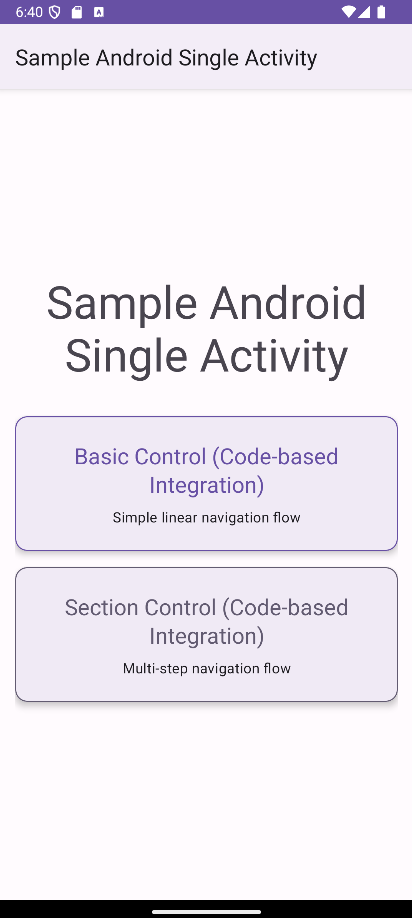
Click the protected button (e.g., "Section Control (Code-based Integration)" card)
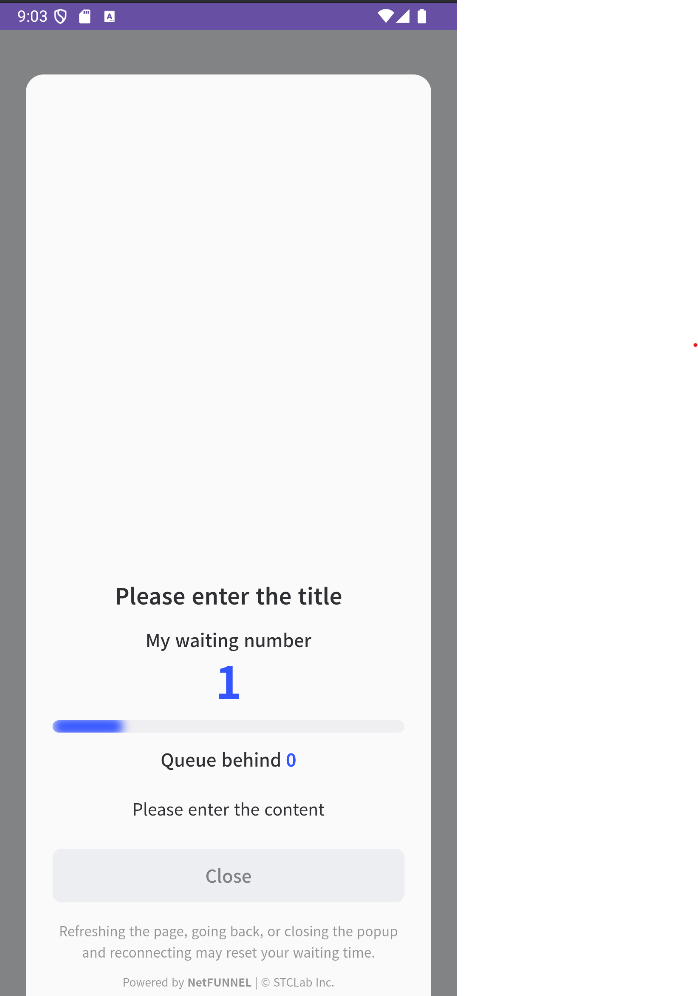
Expected result: Waiting room WebView appears on current screen
6.2 Verify Waiting Room Display
Check these elements are shown correctly:
With Limited Inflow set to 0 and only one user connected, verify:
- My waiting number: 1
- Estimated Wait Time: Not displayed (Section Control only)
- Queue behind: 0
Section Control does not display estimated wait time because users already in the section have varying completion times that are difficult to predict. Unlike Basic Control where entry is quick and predictable, Section Control users may spend different amounts of time completing their multi-step processes.
6.3 Check Logcat Activity
Verify NetFUNNEL logs:
Enable debug logging by setting printLog = true in your Application class, then filter Logcat with package:mine NetFUNNEL. You should see logs like:
2025-09-15 17:30:24.506  7138-7138  NetFUNNEL               com...ample_android_single_activity  D  [NF4] Initialization successful. NetFUNNEL Version: 4.3.3-onprem
2025-09-15 17:30:27.647  7138-7158  NetFUNNEL               com...ample_android_single_activity  D  [NF4] Initial entry detected. Request(5002), Work(projectKey=service_1, segmentKey=segKey_2548), Control(SECTION)
2025-09-15 17:30:27.696  7138-7156  NetFUNNEL               com...ample_android_single_activity  D  [NF4] Sending 5002 request. https://nf4-onprem-demo-4525.stclab.com/ts.wseq?opcode=5002&key=72D5F5FB98C3C27813CF5B7106D11EDD7796632DC8DA328ACD21E27878B567DD43DDCFCA79225210E75F65F358703A67BCFD08B8F833299D4D743DBF3C84B6D4359F81879079494C2A0482939478A89794D7C8E4BEA05A019FF78476D2CEAF2F2C312C302C302C302C302C30&sticky=nf1
2025-09-15 17:30:29.267  7138-7156  NetFUNNEL               com...ample_android_single_activity  D  [NF4] Received 5002 response. Response(timestamp=1757925029406, code=201, msg=null, key=B04303FD454C5CA18924C54783F2BC494399438D1C0EE7AA0512477FC651CDA8D0C0F1928FD7C09AB18E7593EAE92B7FBCFD08B8F833299D4D743DBF3C84B6D4359F81879079494C2A0482939478A897BD882ABDAC46FAEC31605E83E9F49CD72C312C312C302C302C302C30, nwait=1, nnext=0, tps=0.0, ttl=1, ip=nf4-onprem-demo-4525.stclab.com, port=443, vwrHtml=https://nf4-onprem-demo-4525.stclab.com/content/netfunnel-statics/assets/vwr-page/page/1/1/1/index.html, vwrType=wait, preBeginTs=null, preEndTs=null, postBeginTs=null, postEndTs=null, sticky=nf1, liveMessage=null, chkEnterCnt=0)
2025-09-15 17:30:29.274  7138-7156  NetFUNNEL               com...ample_android_single_activity  D  [NF4] Loading the virtual room. Work(projectKey=service_1, segmentKey=segKey_2548), Status(WAIT)
2025-09-15 17:30:30.007  7138-7156  NetFUNNEL               com...ample_android_single_activity  D  [NF4] Fetching HTML content from following URL. https://nf4-onprem-demo-4525.stclab.com/content/netfunnel-statics/assets/vwr-page/page/1/1/1/index.html
2025-09-15 17:30:30.396  7138-7230  NetFUNNEL               com...ample_android_single_activity  D  [NF4] Sending 5002 request. https://nf4-onprem-demo-4525.stclab.com/ts.wseq?opcode=5002&key=B04303FD454C5CA18924C54783F2BC494399438D1C0EE7AA0512477FC651CDA8D0C0F1928FD7C09AB18E7593EAE92B7FBCFD08B8F833299D4D743DBF3C84B6D4359F81879079494C2A0482939478A897BD882ABDAC46FAEC31605E83E9F49CD72C312C312C302C302C302C30&sticky=nf1
2025-09-15 17:30:30.462  7138-7157  NetFUNNEL               com...ample_android_single_activity  D  [NF4] Received 5002 response. Response(timestamp=1757925031536, code=201, msg=null, key=B04303FD454C5CA18924C54783F2BC496041E95666117EA3413E1FA1CF7D93C83F3BBCFCE4DDF36303B4D29BAB59285BBCFD08B8F833299D4D743DBF3C84B6D4359F81879079494C2A0482939478A89724B5E2DCE14558567E22635B848476732C312C302C302C302C302C30, nwait=0, nnext=0, tps=0.0, ttl=1, ip=nf4-onprem-demo-4525.stclab.com, port=443, vwrHtml=https://nf4-onprem-demo-4525.stclab.com/content/netfunnel-statics/assets/vwr-page/page/1/1/1/index.html, vwrType=wait, preBeginTs=null, preEndTs=null, postBeginTs=null, postEndTs=null, sticky=nf1, liveMessage=null, chkEnterCnt=0)
Key indicators that everything is working:
| Log Message | What It Means | Status |
|---|---|---|
[NF4] Initialization successful | NetFUNNEL agent loaded correctly | ✅ Good |
[NF4] Initial entry detected | nfStartSection() was called successfully | ✅ Good |
[NF4] Sending 5002 request | Request sent to NetFUNNEL server | ✅ Good |
[NF4] Received 5002 response with code=201 | Server responded with WAIT status | ✅ Good |
[NF4] Loading the virtual room | Waiting room WebView is loading | ✅ Good |
[NF4] Fetching HTML content | Waiting room HTML is being loaded | ✅ Good |
[NF4] Sending 5002 request | Periodic re-entry requests (polling) | ✅ Good |
[NF4] Received 5002 response with code=201 | Server responded with WAIT status | ✅ Good |
Verify response:
- Look for
ts.wseq?opcode=5002requests in the logs - Check response shows
code=201(WAIT) 201= WAIT,200= PASS (entry allowed)- Here, since Limited Inflow is 0, the correct response is
201
Step 7: Test Section Entry (Limited Inflow = 1)
7.1 Update Segment Settings
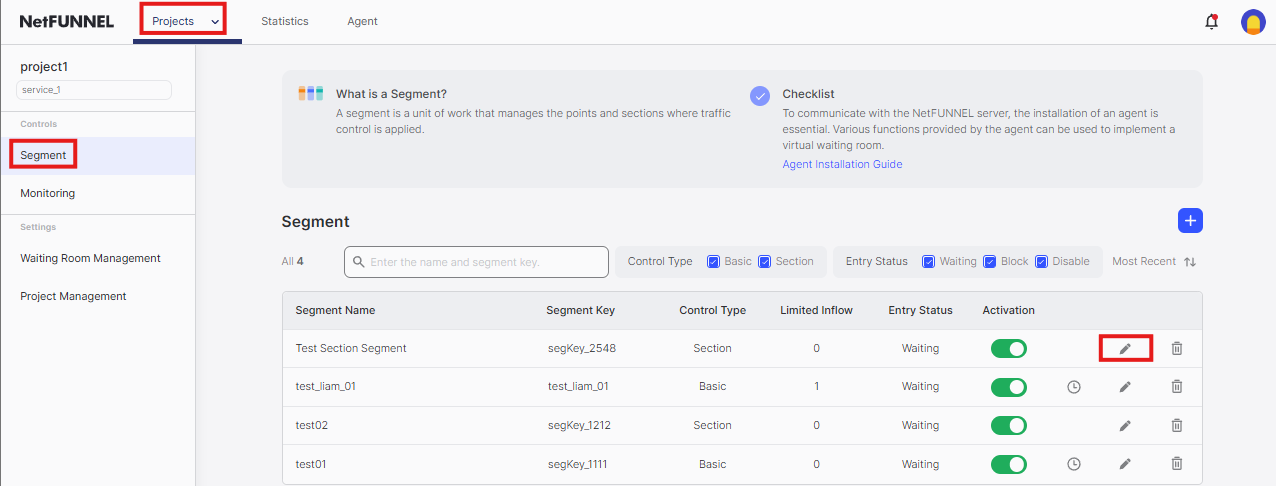
- Return to NetFUNNEL console
- Click segment's
Editbutton to open the edit screen
- Change Limited Inflow from
0to1 - Click
Confirmat the bottom
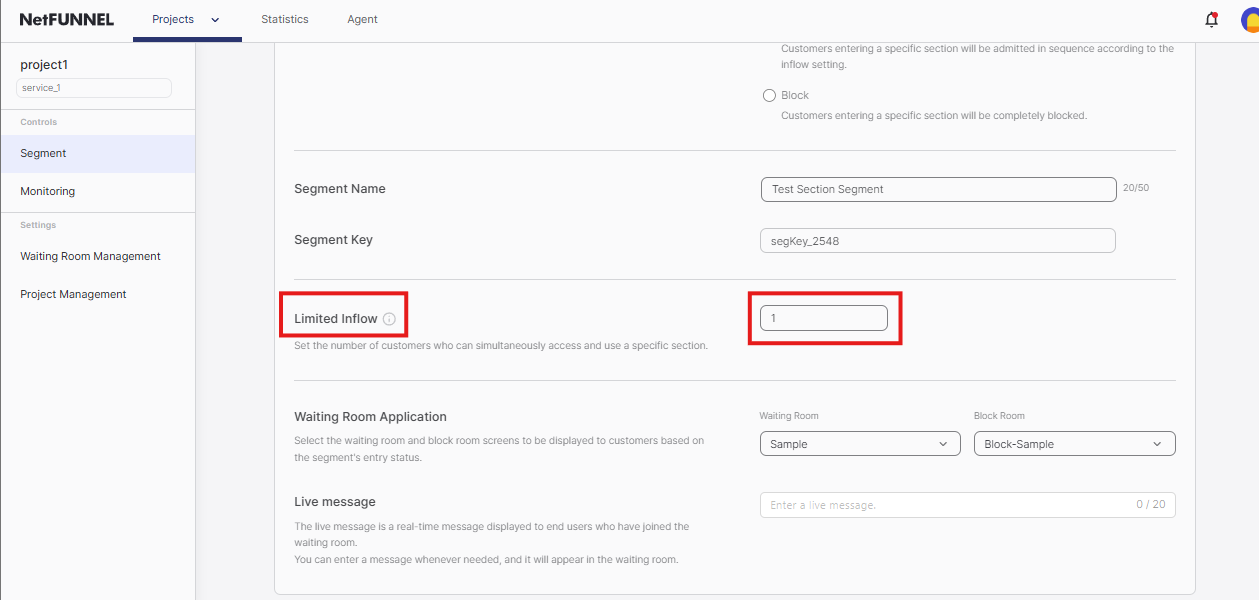
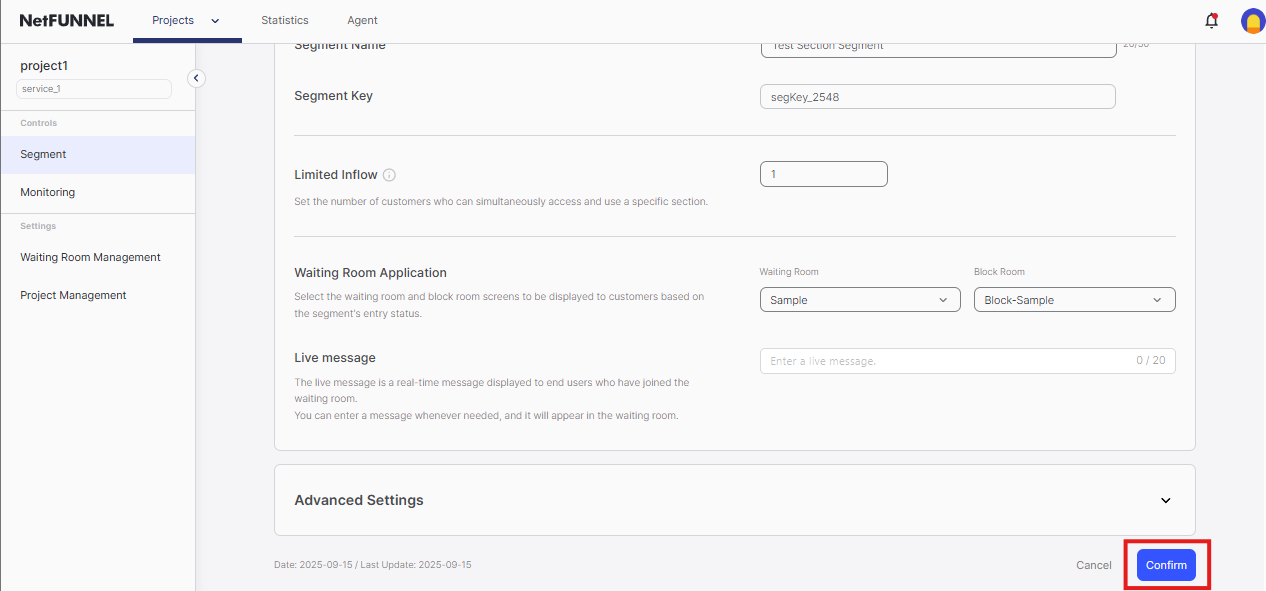
As soon as you click Confirm, the waiting room will disappear and you will immediately navigate to SectionControlSection1Fragment. If you want to observe this moment, keep another screen open where the waiting room is currently displayed.
7.2 Verify Section Entry
Expected result: Waiting room disappears immediately, navigation to SectionControlSection1Fragment occurs
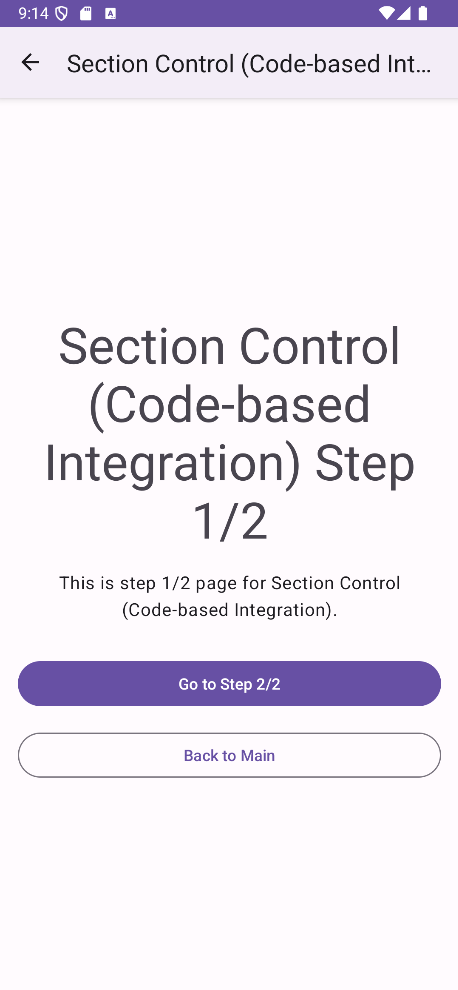
Check Logcat for entry confirmation:
You should see logs like:
2025-09-15 17:30:36.726  7138-7182  NetFUNNEL               com...ample_android_single_activity  D  [NF4] Received 5002 response. Response(timestamp=1757925037810, code=200, msg=null, key=B04303FD454C5CA18924C54783F2BC49C0C7D49B86899E082C565EED4F443625926DA265156909BA64B87F00F7C565325F6C6B5A1410BD25FF45AAF2D0FCF38570442F1BB67CC53F28D02A19B48CDEE2902D1EA62CCD2C8E006BBC45D5A080019F32F0077492B7D5F8DB92356655AFF1302C302C30, nwait=0, nnext=0, tps=0.0, ttl=0, ip=nf4-onprem-demo-4525.stclab.com, port=443, vwrHtml=https://nf4-onprem-demo-4525.stclab.com/content/netfunnel-statics/assets/vwr-page/page/1/1/1/index.html, vwrType=null, preBeginTs=null, preEndTs=null, postBeginTs=null, postEndTs=null, sticky=nf1, liveMessage=null, chkEnterCnt=1)
2025-09-15 17:30:36.740  7138-7182  NetFUNNEL               com...ample_android_single_activity  D  [NF4] "Success" response from NetFUNNEL Server.
2025-09-15 17:30:36.740  7138-7182  NetFUNNEL               com...ample_android_single_activity  D  onSuccess(statusCode=200, message='Success')
2025-09-15 17:30:36.750  7138-7182  NetFUNNEL               com...ample_android_single_activity  D  [NF4] Key refresh attempt detected. Work(projectKey=service_1, segmentKey=segKey_2548), Control(SECTION)
2025-09-15 17:30:36.758  7138-7182  NetFUNNEL               com...ample_android_single_activity  D  [NF4] Sending 5003 request. https://nf4-onprem-demo-4525.stclab.com/ts.wseq?opcode=5003&key=B04303FD454C5CA18924C54783F2BC49C0C7D49B86899E082C565EED4F443625926DA265156909BA64B87F00F7C565325F6C6B5A1410BD25FF45AAF2D0FCF38570442F1BB67CC53F28D02A19B48CDEE2902D1EA62CCD2C8E006BBC45D5A080019F32F0077492B7D5F8DB92356655AFF1302C302C30&sticky=nf1
2025-09-15 17:30:36.808  7138-7157  NetFUNNEL               com...ample_android_single_activity  D  [NF4] Received 5003 response. Response(timestamp=1757925037885, code=201, msg=null, key=B04303FD454C5CA18924C54783F2BC49C0C7D49B86899E082C565EED4F443625926DA265156909BA64B87F00F7C565325F6C6B5A1410BD25FF45AAF2D0FCF38570442F1BB67CC53F28D02A19B48CDEE2902D1EA62CCD2C8E006BBC45D5A080019F32F0077492B7D5F8DB92356655AFF1312C302C30, nwait=0, nnext=0, tps=0.0, ttl=5, ip=nf4-onprem-demo-4525.stclab.com, port=443, vwrHtml=https://nf4-onprem-demo-4525.stclab.com/content/netfunnel-statics/assets/vwr-page/page/1/1/1/index.html, vwrType=null, preBeginTs=null, postEndTs=null, postBeginTs=null, postEndTs=null, sticky=nf1, liveMessage=null, chkEnterCnt=1)
2025-09-15 17:30:37.725  7138-7138  VRI[NetfunnelWebView]   com...ample_android_single_activity  D  visibilityChanged oldVisibility=true newVisibility=false
Key indicators of successful section entry:
| Log Message | What It Means | Status |
|---|---|---|
[NF4] Received 5002 response with code=200 | Entry granted - waiting room should close | ✅ Good |
[NF4] "Success" response from NetFUNNEL Server | Success response received | ✅ Good |
onSuccess(statusCode=200, message='Success') | Success callback fired | ✅ Good |
[NF4] Key refresh attempt detected | Section Control: Key timeout extension initiated | ✅ Good |
[NF4] Sending 5003 request | Section Control: Key timeout extension request sent | ✅ Good |
visibilityChanged oldVisibility=true newVisibility=false | Waiting room WebView closed | ✅ Good |
7.3 Test Section Navigation
Navigate through the section flow:
- Section1 → Section2 → End: Complete the multi-step section process
- Verify each step works correctly: Ensure smooth navigation between fragments
- Check timeout extension logs: Look for periodic 5003 requests during section
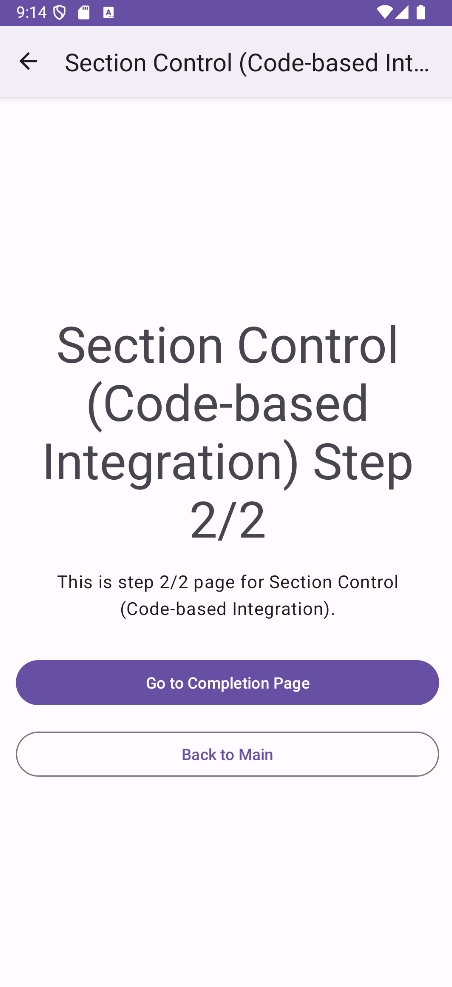
Expected behavior:
- User can freely navigate within the section (Section1 → Section2 → End)
- NetFUNNEL automatically extends key timeout (5003 requests) during section
- Section capacity is maintained until explicit completion
7.4 Check Key Return
Verify successful key return:
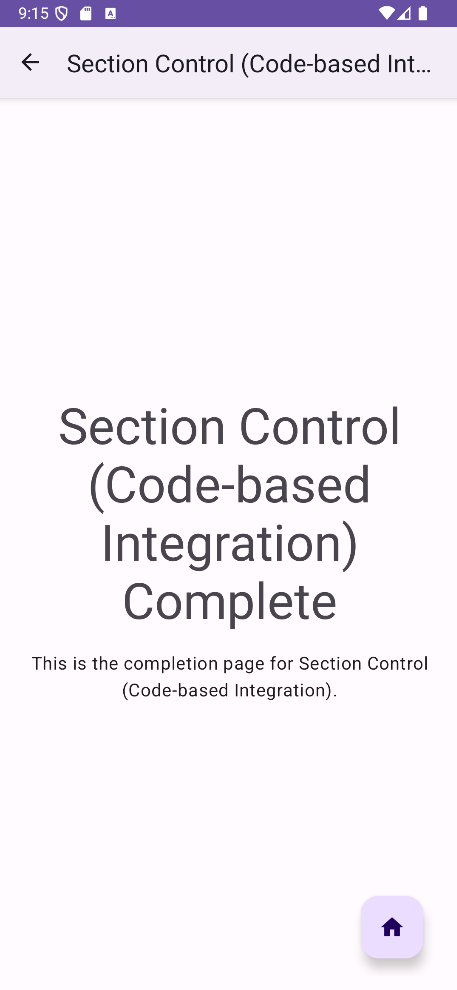
Look for these logs in Logcat when reaching the End fragment:
2025-09-15 17:30:59.015  7138-7158  NetFUNNEL               com...ample_android_single_activity  D  [NF4] Key return attempt detected. Work(projectKey=service_1, segmentKey=segKey_2548), Control(SECTION)
2025-09-15 17:30:59.019  7138-7158  NetFUNNEL               com...ample_android_single_activity  D  [NF4] Sending 5004 request. https://nf4-onprem-demo-4525.stclab.com/ts.wseq?opcode=5004&key=B04303FD454C5CA18924C54783F2BC49951551C40A5E72EE425E8BBE7154D8917EDEA09F96A8542EE989BA43DF1619125F6C6B5A1410BD25FF45AAF2D0FCF38570442F1BB67CC53F28D02A19B48CDEE2902D1EA62CCD2C8E006BBC45D5A080018D551F84A0705E2E596EA1998D395695312C302C30&sticky=nf1
2025-09-15 17:30:59.062  7138-7158  NetFUNNEL               com...ample_android_single_activity  D  [NF4] Received 5004 response. Response(timestamp=1757925060140, code=200, msg=null, key=B04303FD454C5CA18924C54783F2BC49951551C40A5E72EE425E8BBE7154D8917EDEA09F96A8542EE989BA43DF1619125F6C6B5A1410BD25FF45AAF2D0FCF38570442F1BB67CC53F28D02A19B48CDEE2902D1EA62CCD2C8E006BBC45D5A080018D551F84A0705E2E596EA1998D395695312C302C30, nwait=0, nnext=0, tps=0.0, ttl=5, ip=nf4-onprem-demo-4525.stclab.com, port=443, vwrHtml=https://nf4-onprem-demo-4525.stclab.com/content/netfunnel-statics/assets/vwr-page/page/1/1/1/index.html, vwrType=null, preBeginTs=null, postEndTs=null, postBeginTs=null, postEndTs=null, sticky=nf1, liveMessage=null, chkEnterCnt=1)
2025-09-15 17:30:59.062  7138-7158  NetFUNNEL               com...ample_android_single_activity  D  [NF4] "Success" response from NetFUNNEL Server.
2025-09-15 17:30:59.063  7138-7158  NetFUNNEL               com...ample_android_single_activity  D  Section key returned: Key Return Successful
Key indicators of successful key return:
| Log Message | What It Means | Status |
|---|---|---|
[NF4] Key return attempt detected | nfStopSection() was called | ✅ Good |
[NF4] Sending 5004 request | Key return request sent to server | ✅ Good |
[NF4] Received 5004 response with code=200 | Key return successful | ✅ Good |
Section key returned: Key Return Successful | Complete callback fired | ✅ Good |
Summary
Essential Points (Must Do)
Setup:
- Complete Installation & Initialization and verify NetFUNNEL agent loads correctly
- Create segment in console with Section Control
- Get Project Key and Segment Key from console
- Set Limited Inflow to 0 for testing, 1+ for production
Integration:
- Add required imports:
com.nf4.Netfunnel,com.nf4.NetfunnelCallback, andcom.nf4.NetfunnelCompleteCallback - Implement ALL callback methods (Android interface requirement)
- Wrap section entry with
Netfunnel.nfStartSection()in click handlers - Handle
onSuccesscallback to execute section entry logic - Call
Netfunnel.nfStopSection()after section completes - Use identical keys in both
nfStartSection()andnfStopSection()
Error Handling:
- Handle
onErrorby proceeding with section entry (maintains service availability) - Handle
onNetworkErrorby logging only (useuseNetworkRecoveryMode = true) - Handle
onBlockby showing appropriate user message - Handle
onCloseby staying on current fragment (user canceled) - Implement comprehensive logging for all callback responses
Testing:
- Test waiting room appears with Limited Inflow = 0
- Test entry works with Limited Inflow = 1+
- Verify key return occurs after section completion
- Check Logcat for NetFUNNEL logs with
package:mine NetFUNNELfilter
Optional Items (Nice to Have)
Error Handling Enhancements:
- Add user-friendly error messages instead of basic logging
- Implement custom error handling strategies for different response types
- Add analytics tracking for NetFUNNEL events
Code Organization:
- Create centralized configuration constants
- Build reusable NetFUNNEL wrapper functions
- Implement modular integration patterns across multiple fragments
Best Practices
Required Imports
import com.nf4.Netfunnel
import com.nf4.NetfunnelCallback
import com.nf4.NetfunnelCompleteCallback
Why these imports matter:
- Essential for NetFUNNEL integration
- Must be added to any Fragment/Activity using NetFUNNEL
- Required for both
nfStartSection()andnfStopSection()functions
Complete Callback Implementation
private val sectionControlCallback = object : NetfunnelCallback() {
    override fun onSuccess(statusCode: Int, message: String) {
        // Execute section entry logic when entry is granted
        Log.d("NetFUNNEL", "onSuccess(statusCode=$statusCode, message='$message')")
        lifecycleScope.launch {
            navigationManager.navigateWithDelay(
                R.id.action_mainFragment_to_sectionControlSection1Fragment
            )
        }
    }

    override fun onError(statusCode: Int, message: String) {
        // System error - proceed anyway to maintain service availability
        Log.d("NetFUNNEL", "onError(statusCode=$statusCode, message='$message')")
        lifecycleScope.launch {
            navigationManager.navigateWithDelay(
                R.id.action_mainFragment_to_sectionControlSection1Fragment
            )
        }
    }

    override fun onNetworkError(statusCode: Int, message: String) {
        // Network error - log only, rely on network recovery mode
        Log.d("NetFUNNEL", "onNetworkError(statusCode=$statusCode, message='$message')")
        // Business logic not executed here - see explanation below
    }

    override fun onBlock(statusCode: Int, message: String) {
        // User is blocked - show appropriate message
        Log.d("NetFUNNEL", "onBlock(statusCode=$statusCode, message='$message')")
    }

    override fun onClose(statusCode: Int, message: String) {
        // User closed waiting room - handle appropriately
        Log.d("NetFUNNEL", "onClose(statusCode=$statusCode, message='$message')")
        // Stay on main fragment - user canceled
    }

    override fun onContinue(
        statusCode: Int,
        message: String,
        aheadWait: Int,
        behindWait: Int,
        waitTime: String,
        progressRate: Int
    ) {
        Log.d("NetFUNNEL", "onContinue(statusCode=$statusCode, message='$message', aheadWait=$aheadWait, behindWait=$behindWait, waitTime='$waitTime', progressRate=$progressRate)")
    }
}
Key principle: Always implement ALL callback methods - Android interface requirement.
Centralized Configuration
// Store your keys in one place
companion object {
    private const val PROJECT_KEY = "your_project_key"
    private const val SEGMENT_KEY = "your_segment_key"
}

// Use the same config everywhere
Netfunnel.nfStartSection(
    projectKey = PROJECT_KEY,
    segmentKey = SEGMENT_KEY,
    callback = sectionControlCallback,
    activity = requireActivity()
)

Netfunnel.nfStopSection(
    projectKey = PROJECT_KEY,
    segmentKey = SEGMENT_KEY,
    completeCallback = completeCallback
)
Benefits:
- Easy to update keys across your entire app
- Reduces copy-paste errors
- Single source of truth for configuration
Robust Error Handling Strategy
// Why onError executes business logic but onNetworkError doesn't:

// onError (Status Code 500) - Server Error
override fun onError(statusCode: Int, message: String) {
    // Scenario: NetFUNNEL server encounters internal errors
    // Strategy: Execute business logic to maintain service availability
    // Rationale: Server errors are typically temporary and shouldn't block user access
    // Result: Robust service that continues even when NetFUNNEL has issues
    sectionEntryLogic()
}

// onNetworkError (Status Code 1001, 1002) - Network Issues
override fun onNetworkError(statusCode: Int, message: String) {
    // Scenario: Network connectivity problems (offline, timeout)
    // Strategy: Log only, don't execute business logic
    // Rationale: Use useNetworkRecoveryMode = true for automatic network recovery
    // Result: Users stay in waiting room during network issues and auto-resume when connectivity returns
    Log.d("NetFUNNEL", "onNetworkError(statusCode=$statusCode, message='$message')")
}
Key principle: Always proceed with business logic on system errors to maintain service availability.
Network Recovery Mode Configuration
// SampleApplication.kt
Netfunnel.initialize(
    clientId = "{{CLIENT_ID}}",
    useNetworkRecoveryMode = true  // Enable automatic network recovery
)
Benefits:
- Automatic handling of network connectivity issues
- Users automatically resume when network returns
- Reduces manual network error handling complexity
Always Return Keys
// Return key after section completion
override fun onViewCreated(view: View, savedInstanceState: Bundle?) {
    super.onViewCreated(view, savedInstanceState)

    // Return key when section end is reached
    Netfunnel.nfStopSection(
        projectKey = PROJECT_KEY,
        segmentKey = SEGMENT_KEY,
        completeCallback = completeCallback
    )
}

private val completeCallback = object : NetfunnelCompleteCallback() {
    override fun onComplete(statusCode: Int, message: String) {
        Log.d("NetFUNNEL", "Section key returned: $message")
    }
}
When to return keys:
- After section completes (Section1 → Section2 → End)
- After multi-step processes finish
- After business operations complete
- Even when operations fail
Key Matching
// Start and stop must use identical keys
const val PROJECT_KEY = "your_project_key"
const val SEGMENT_KEY = "your_segment_key"

Netfunnel.nfStartSection(
    projectKey = PROJECT_KEY,
    segmentKey = SEGMENT_KEY,
    callback = callback,
    activity = requireActivity()
)

Netfunnel.nfStopSection(
    projectKey = PROJECT_KEY,  // Must match exactly
    segmentKey = SEGMENT_KEY, // Must match exactly
    completeCallback = completeCallback
)
Comprehensive Logging
// Enable debug logging in Application class
Netfunnel.initialize(
    clientId = "{{CLIENT_ID}}",
    printLog = true  // Enable detailed logging
)

// Filter Logcat with: package:mine NetFUNNEL
Logging benefits:
- Easy debugging of NetFUNNEL integration issues
- Track request/response flow
- Monitor key return operations
- Identify network connectivity problems
Common Issues & Troubleshooting
Waiting Room Never Appears
Symptoms: Button click works normally, no waiting room shows up
Debug Steps:
- Check Logcat for Android errors:
adb logcat | grep -i error - Verify NetFUNNEL initialization in Application class
- Confirm segment is activated (not deactivated) in console
- Check Limited Inflow is set to 0 for testing
- Verify Project Key and Segment Key match console exactly (case-sensitive)
Callback Never Fires
Symptoms: nfStartSection() called but no response received
Debug Steps:
- Check Logcat for NetFUNNEL logs:
adb logcat | grep NetFUNNEL - Verify network connectivity to NetFUNNEL servers
- Check if segment is activated (not deactivated)
- Try with Limited Inflow = 0 to force waiting room
- Ensure all callback methods are implemented (Android requirement)
Users Stuck in Queue
Symptoms: First user enters, but second user never gets through
Debug Steps:
- Check if
nfStopSection()is being called after section completes - Verify keys in
nfStopSection()matchnfStartSection()exactly - Look for Android errors preventing
nfStopSection()execution - Check Logcat for
[NF4] Key return attempt detectedlogs - Verify
[NF4] Sending 5004 requestappears in logs
Waiting Room Shows But Never Allows Entry
Symptoms: Waiting room appears but user never gets through, even with Limited Inflow = 1
Debug Steps:
- Check segment status in console - ensure it's not in "Block" mode
- Verify Limited Inflow is set to 1 or higher
- Check Logcat for
[NF4] Sending 5002 request(re-entry requests) - Look for error responses in the NetFUNNEL logs
- Verify network connectivity to NetFUNNEL servers
App Crashes on NetFUNNEL Calls
Symptoms: App crashes when calling nfStartSection() or nfStopSection()
Debug Steps:
- Check if required imports are added:
com.nf4.Netfunnel,com.nf4.NetfunnelCallback,com.nf4.NetfunnelCompleteCallback - Verify NetFUNNEL is initialized in Application class
- Ensure all callback methods are implemented (Android interface requirement)
- Check if activity context is passed correctly to
nfStartSection() - Verify NetFUNNEL agent is properly installed
Key Return Fails
Symptoms: nfStopSection() called but key not returned
Debug Steps:
- Verify keys in
nfStopSection()matchnfStartSection()exactly (case-sensitive) - Check Logcat for
[NF4] Key return attempt detectedmessage - Look for
[NF4] Sending 5004 requestin logs - Verify
[NF4] Received 5004 responsewithcode=200 - Ensure
NetfunnelCompleteCallbackis implemented
Section Timeout Issues
Symptoms: Keys are automatically returned before section completion
Debug Steps:
- Check timeout settings in NetFUNNEL console → Segment → Advanced Settings →
Timeout - Verify section duration exceeds timeout period (default 20s)
- Look for
[NF4] Sending 5003 requestlogs (key timeout extension) - Ensure
nfStopSection()is called before timeout expires - Check if section navigation flow completes within timeout period
Network Recovery Issues
Symptoms: Users get stuck during network connectivity problems
Debug Steps:
- Verify
useNetworkRecoveryMode = truein Application initialization - Check network connectivity to NetFUNNEL servers
- Test with airplane mode on/off to simulate network issues
- Monitor Logcat for
onNetworkErrorcallback calls - Ensure
onNetworkErrordoesn't execute business logic (relies on recovery mode)
QA Checklist
Pre-Implementation Verification
- Project Key / Segment Key match console exactly (reconfirm in console)
- NetFUNNEL agent properly initialized in Application class
- Required imports added:
com.nf4.Netfunnel,com.nf4.NetfunnelCallback,com.nf4.NetfunnelCompleteCallback - All callback methods implemented (Android interface requirement)
Waiting Room Testing (Limited Inflow = 0)
- With Limited Inflow = 0, waiting room WebView displays correctly
- Waiting room shows correct details:
- My waiting number: 1
- Estimated Wait Time: Not displayed (Section Control only)
- Queue behind: 0
- While waiting,
[NF4] Sending 5002 requestappears periodically in Logcat -
[NF4] Received 5002 responseshowscode=201(WAIT)
Section Entry Testing (Limited Inflow = 1)
- When changing to Limited Inflow = 1,
onSuccesscallback fires -
onSuccesscallback executes original section entry logic - Waiting room disappears immediately upon entry
- Navigation to SectionControlSection1Fragment occurs successfully
Section Navigation Testing
- Section navigation works correctly (Section1 → Section2 → End)
- Key timeout extension occurs automatically (5003 requests)
-
[NF4] Sending 5003 requestappears periodically during section -
[NF4] Received 5003 responseshowscode=201 - Section capacity is maintained until explicit completion
Key Return Verification
- At section completion point, key return works correctly
-
[NF4] Key return attempt detectedappears in Logcat -
[NF4] Sending 5004 requestoccurs with HTTP 200 -
[NF4] Received 5004 responseshowscode=200 - Key return happens exactly once per
nfStartSectioncall - Key return occurs after section completion
Error Handling
- Callback branching implemented for all required states:
-
onSuccess- executes original logic -
onError- handles system errors appropriately (proceeds with section entry) -
onNetworkError- handles network issues appropriately (logs only) -
onBlock- handles blocked state appropriately -
onClose- handles user cancellation appropriately -
onContinue- handles waiting progress appropriately
-
- Network recovery mode enabled in Application initialization
- Key matching -
projectKey/segmentKeyidentical innfStartSectionandnfStopSection - Comprehensive logging implemented for all callback responses
Logcat Verification
- NetFUNNEL logs visible with
package:mine NetFUNNELfilter - Initialization successful message appears
- Initial entry detected message appears on button click
- Loading the virtual room message appears
- Key refresh attempt detected message appears (Section Control specific)
- Key return attempt detected message appears
- Section key returned: Key Return Successful message appears in complete callback